Incident Management & Response
Act quickly, improve coordination, and recover faster during high-impact events.
Trusted by Thousands of Organizations Worldwide






Go From Chaos to Coordinated Response in Minutes


Bring Every Moving Piece Into One Common Operating Picture
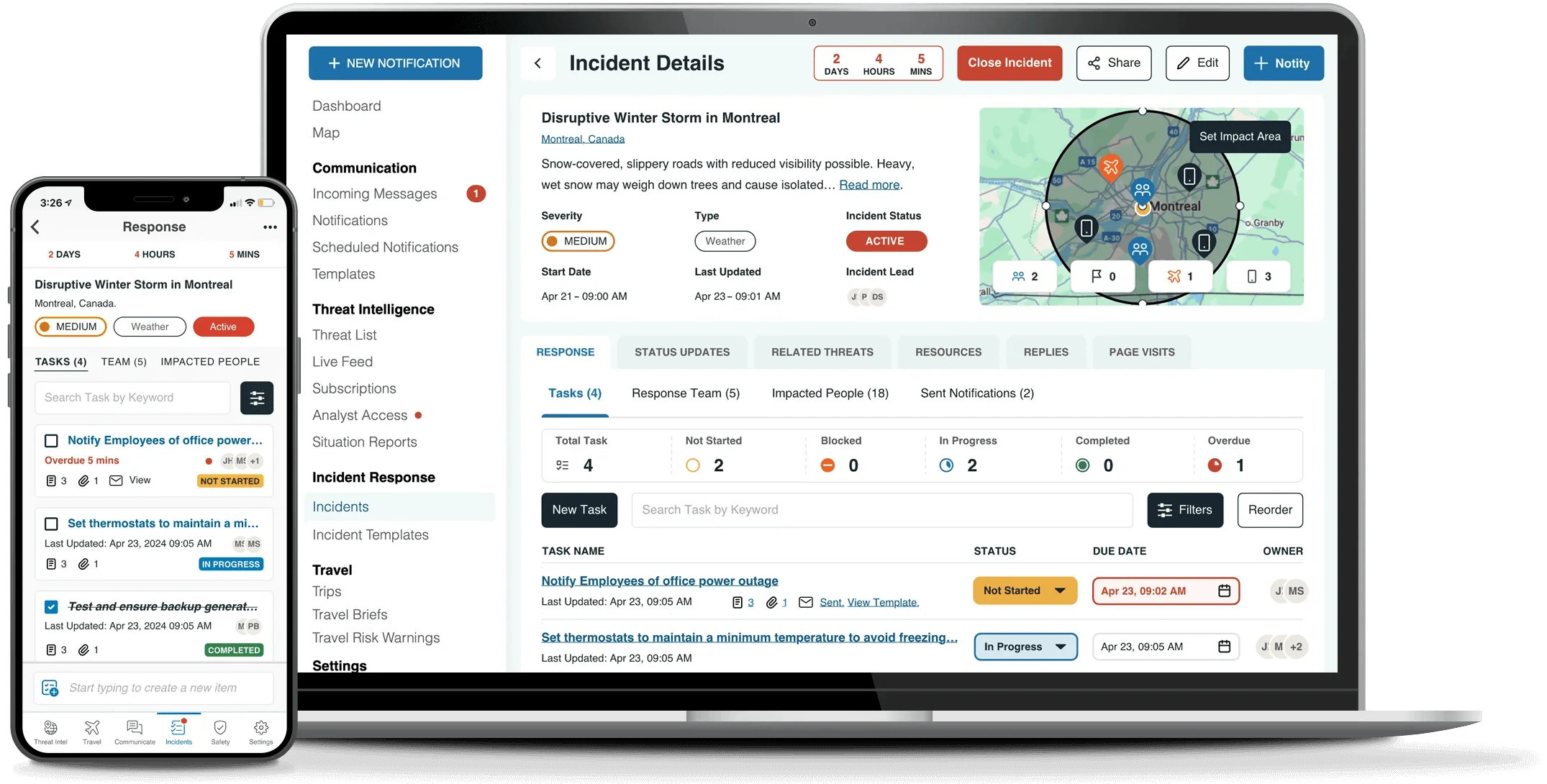
From the first alert to the final after-action review, give team members a clear role, real-time visibility, and the tools to execute without hesitation.
Full Features and Capabilities
- Response plan importer
 Response plan importerUpload an existing response plan and use AI mapping technology to generate a template draft.
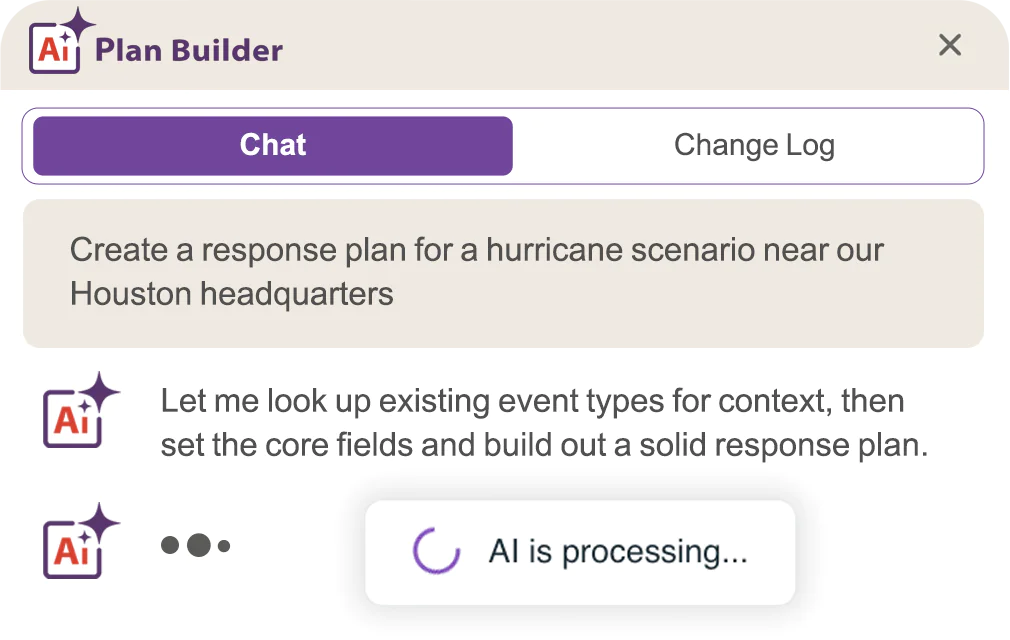
 - AI Plan Builder AI Plan BuilderUse built-in generative AI to build plans from scratch or refine existing templates.
- Response plan templates Response plan templatesDeploy responses with templated plans for any incident type.
- Resource repository Resource repositoryUpload important documents to Incident Pages or tasks.
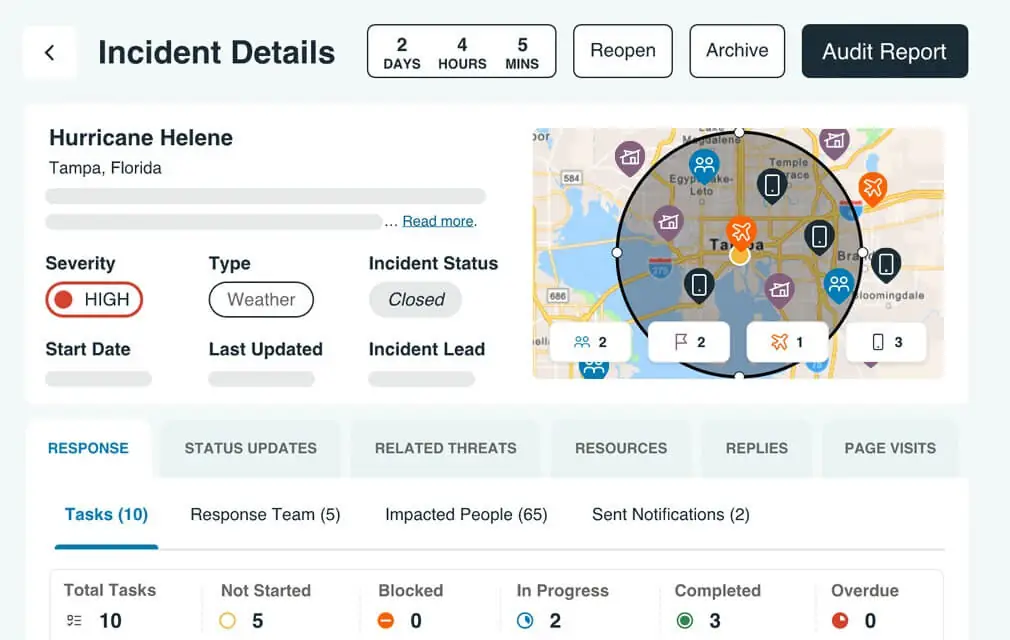
- Centralized incident tracking Centralized incident trackingCustomize tasks lists and workflows to respond to incidents.
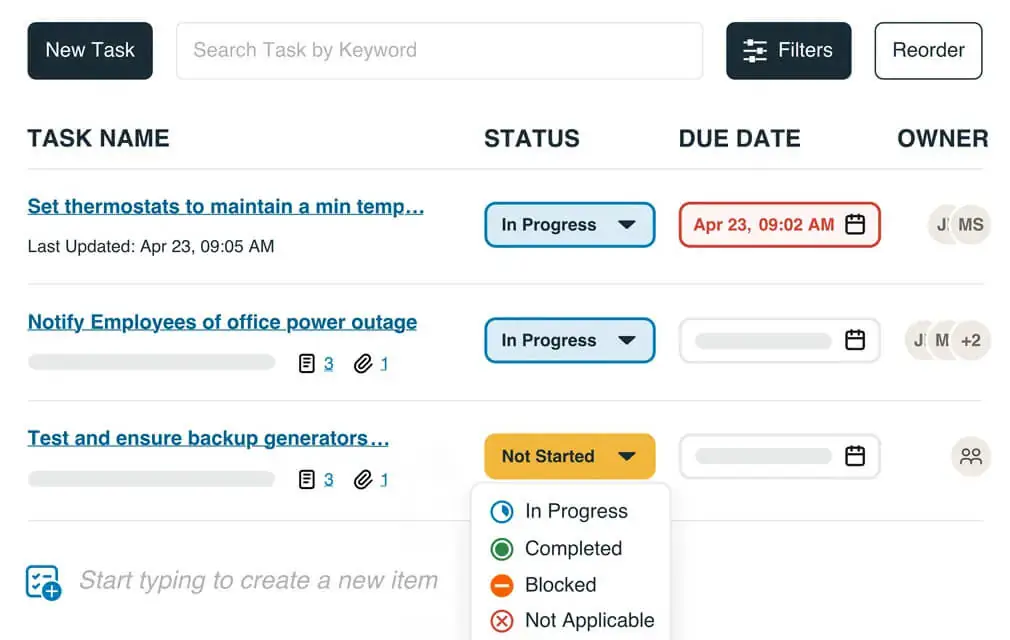
- Task list management Task list managementAssign tasks, set reminders, and collaborate with team members.
- Communication with response team and impacted employees Communication with response team and impacted employeesNotify impacted employees through the right channels.
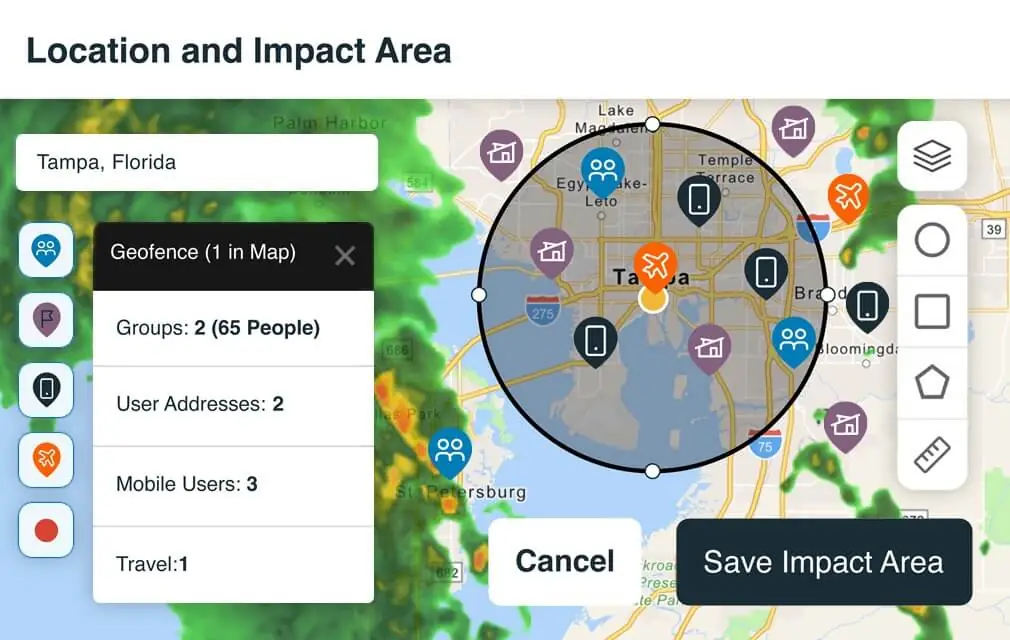
- Impact-based geofencing Impact-based geofencingDefine custom impact areas to monitor people and assets.
- Threat response workflow Threat response workflowCreate an Incident Page from any threat card.
- Incident role and ownership access level Incident role and ownership access levelDesignate permissions for the right team members.
- Post-incident reporting Post-incident reportingReport on actions taken for compliance and audit trails.
- Mobile response plans Mobile response plansAccess playbooks and task lists from any device.

- AI Assistant AI AssistantAsk questions, uncover insights, and take action faster across the AlertMedia platform.
- Visual Intelligence Visual IntelligenceA high-performance map with flexible geofencing, custom views, pre-loaded data layers, import third-party or custom-built data layers.
- API access for customization
- Platform integrations Platform integrationsIntegrate with other systems like security, BCP, TMS.
- Full-featured mobile app Full-featured mobile appMobile for admins and employees (iOS and Android apps).
- Customizable admin roles and access settings
- Simplified data syncing with HRIS Simplified data syncing with HRISAutomatically sync your people data via Active Directory, CSV files, or SFT.
- Dynamic groups Dynamic groupsAutomate user group creation and updates to ensure data integrity.
- Single Sign-On with Automated User Provisioning Single Sign-On with Automated User ProvisioningLeverage your existing user authentication process and manage your users through Azure AD or Okta.
- In-platform data masking In-platform data maskingMask sensitive personal data within the platform for specific admin levels.
- GDPR, CCPA, SOC2 Type 2, ISO 27001 compliance
- Enterprise-level data encryption
- Dedicated success team Dedicated success team24/7 live, world-class support. Get answers fast with an average response time under 10 minutes.
- Ongoing enablement and insights Ongoing enablement and insightsAccess to training resources, best practices, AlertMedia Academy courses, and AlertMedia Exchange customer forum.
- Analytics AnalyticsAI-powered dashboards that help you explore AlertMedia data, measure program performance, and identify trends across your safety, communications, and
response operations.



AlertMedia Works Seamlessly With Your Systems
Easily connect with your existing systems and solutions for a fast, reliable response.


















What Customers Are Saying

Brown & Brown Unifies Global Security and Traveler Protection With AlertMedia
“We can see what’s going on anywhere in the world in real time. That situational awareness helps us act before something turns into a problem.”
Michael Skoglund
VP of Global Physical Security and Incident Response

WPP Strengthens Global Resilience and Employee Safety Across 100+ Countries
“AlertMedia has been a true partner to us. They understand the scale of our business and have worked closely with us to make sure we’re ready to respond and support our people wherever they are.”
James Anderson
Group Director, WPP Global Risk & Resilience

Pohlad Companies Safeguards Over 35 Locations Globally With AlertMedia
“With AlertMedia, we’ve given our people a greater sense of security and confidence in their capabilities to manage in an emergency.”
Mike Goldstein
Vice President of Security and Information Technology




Brown & Brown Unifies Global Security and Traveler Protection With AlertMedia
“We can see what’s going on anywhere in the world in real time. That situational awareness helps us act before something turns into a problem.”
WPP Strengthens Global Resilience and Employee Safety Across 100+ Countries
“AlertMedia has been a true partner to us. They understand the scale of our business and have worked closely with us to make sure we’re ready to respond and support our people wherever they are.”
Pohlad Companies Safeguards Over 35 Locations Globally With AlertMedia
“With AlertMedia, we’ve given our people a greater sense of security and confidence in their capabilities to manage in an emergency.”
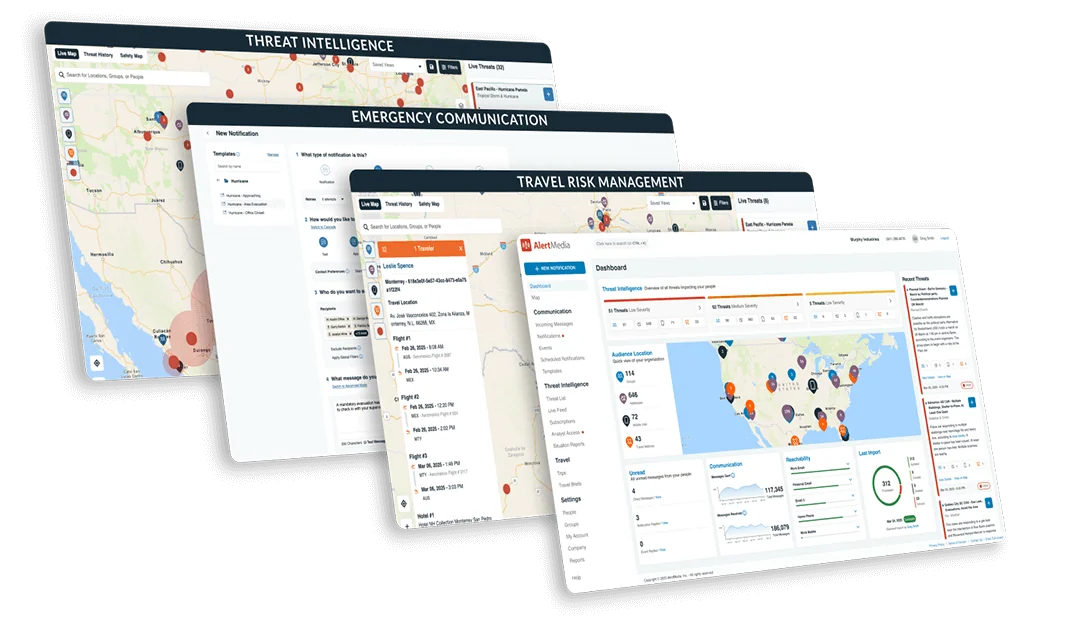
Manage Risk & Your Response From a Single Platform
Trade complexity for clarity with an integrated platform built for end-to-end preparedness.
Management

Management
Notification

Notification
Intelligence

Intelligence
Monitoring

Monitoring


Incident Management

Leader
of Use


Adaptable to Any Incident. Essential to Every Response.
Keep your people safe and operations up and running—no matter what.






Frequently Asked Questions
- How much will AlertMedia cost for my organization?AlertMedia uses custom pricing to build the perfect plan for every customer. There are no setup fees, and 24/7 support is included at no additional cost. As part of your subscription, we will procure your infrastructure, onboard and train your team, and equip you with everything needed to achieve your goals.
- Which channel and systems integrations does AlertMedia support?AlertMedia works seamlessly with the following communication channels and critical business systems to help you reach your employees where they are operating: WhatsApp, Slack, Microsoft Teams, Workday, Oracle PeopleSoft, Azure Active Directory, ADP, Okta, Ceridian, SAP Concur, Egencia, Navan, Traxo, and more. By partnering with these providers, AlertMedia supports your communication strategy to achieve interoperability within your existing ecosystem and ensure reliable communication when you need it most.
- Can non-security teams use Incident Response during an incident?Definitely. Incident Response is designed for cross-functional collaboration, not just security teams. You can easily bring in Legal, HR, IT, Operations, and other departments with role-based access and intuitive workflows that require little to no training. Whether they’re contributing to specific tasks or overseeing compliance, every stakeholder has visibility into what’s happening and what needs to happen next.
- Can I use Incident Response for drills or planned events?Yes. Incident Response isn’t just for real-time emergencies—it’s also ideal for running drills, tabletop exercises, and managing planned events like system upgrades or public gatherings. You can activate pre-built plans, assign tasks, and track participation just as you would in a real incident. Afterward, you’ll have detailed data to support after-action reviews, identify gaps, and strengthen your organization’s readiness over time.
- Can my team access and manage incidents from a mobile device?Yes. Incident Response is fully mobile-responsive, allowing your teams to access plans, complete tasks, and stay informed from any device. Whether they're on the front lines or working remotely, users can participate in real time—without needing to be at a desk. Native mobile enhancements are also on our roadmap to make mobile access even more powerful in the near future.
- How long does onboarding and implementation take?AlertMedia created the ClearPath Migration Program to ensure your implementation and onboarding process is as smooth as possible. With your dedicated customer success manager, you’ll create a customized implementation timeline that meets your organization’s needs. Define onboarding milestones and ensure a smooth transition with support services from a highly experienced team.