By AlertMedia, Risk Intelligence and Response
Uncategorized Jul 16, 2026
Mass Notification System With Geofenced Alerts
Emergency Communications Key Feature Guide
Explore how you can protect your people and business with AlertMedia’s secure, two-way, AI-powered, multichannel notifications.
Table of Contents
- Why Geofenced Alerts Matter for Multi-Location Organizations
- Manual Audience Selection vs. Geofenced Targeting
- How Geofencing Works Inside Emergency Communication
- What to Look for in a Geofenced Notification Capability
- How AlertMedia Approaches Geofenced Mass Notification
- Reach the Right People, Automatically
A mass notification system with geofenced alerts lets organizations draw a boundary around an affected area on a map and automatically identify and message every employee inside it, rather than requiring an administrator to manually build a recipient list. For security and business continuity teams managing multiple facilities, campuses, or field locations, geofencing turns “who do I need to notify right now” from a research problem into an automatic one. This page covers how geofenced alerts work inside AlertMedia’s Emergency Communication, what to look for in a geofencing capability, and how it fits into a broader multichannel notification strategy.
Why Geofenced Alerts Matter for Multi-Location Organizations
Manually identifying who is affected by a developing incident gets harder as an organization’s footprint grows. A few recurring problems show up across security, business continuity, and facilities teams managing distributed locations:
- Manual audience selection is slow. Building a notification list by hand—cross-referencing office rosters, shift schedules, or building directories—costs precious minutes during an active incident.
- Static distribution lists go stale. A list built for one location doesn’t account for visitors, contractors, or employees who have since moved between sites.
- Over-notifying erodes trust. Sending a facility-wide notification for an incident that only affects one wing trains employees to tune out future notifications.
- Distributed and field workforces complicate targeting further. Employees working across warehouses, retail locations, or client sites may not appear on any single facility roster at all.
Manual Audience Selection vs. Geofenced Targeting
| Capability | Manual Audience Selection | Geofenced Alerts |
| Identifying who is affected | Admin manually cross-references rosters, directories, or shift schedules. | The platform automatically identifies people inside a drawn geographic boundary. |
| Speed to first notification | Limited by how quickly a list can be assembled. | Notification-ready as soon as the boundary is drawn. |
| Accuracy as the workforce changes | Requires manual list maintenance to stay current. | Dynamic User Groups update automatically as location and role data change. |
| Scope control | Tends toward over-notifying an entire facility or department. | Boundaries can be drawn tightly around the actual affected area. |
How Geofencing Works Inside Emergency Communication
Geofencing is a capability within AlertMedia’s Emergency Communication, powered by Visual Intelligence, the mapping feature that underlies map-based context and targeting across the AlertMedia Platform.
Draw the affected area
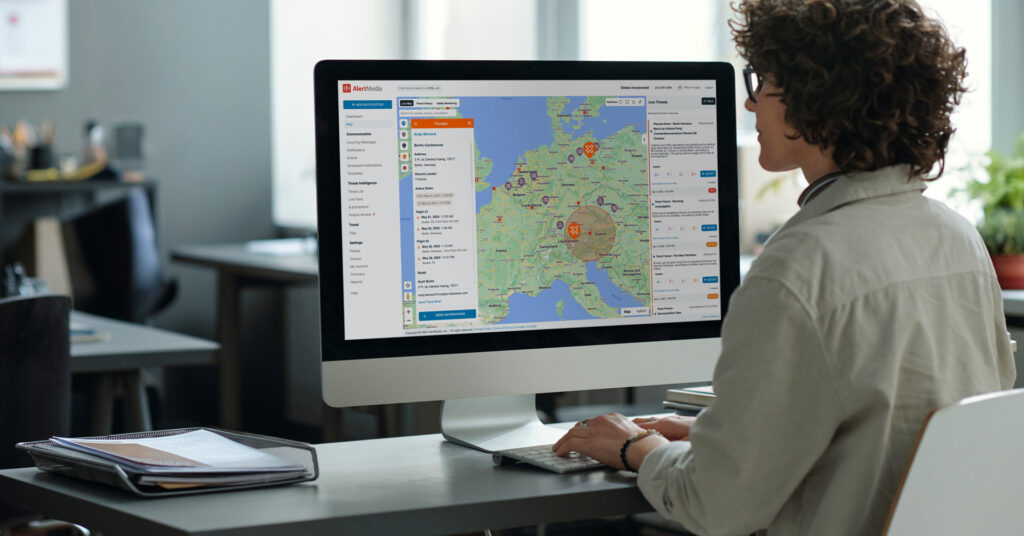
An admin draws a boundary directly on a live map around the incident location—a building, a campus, a city block, or a custom shape—rather than selecting from a predefined list.
Automatically identify who is inside it
Dynamic User Groups, built from HRIS-synced location and role data, populate automatically with the people who fall inside the drawn boundary at that moment.
Send across the channels people actually use
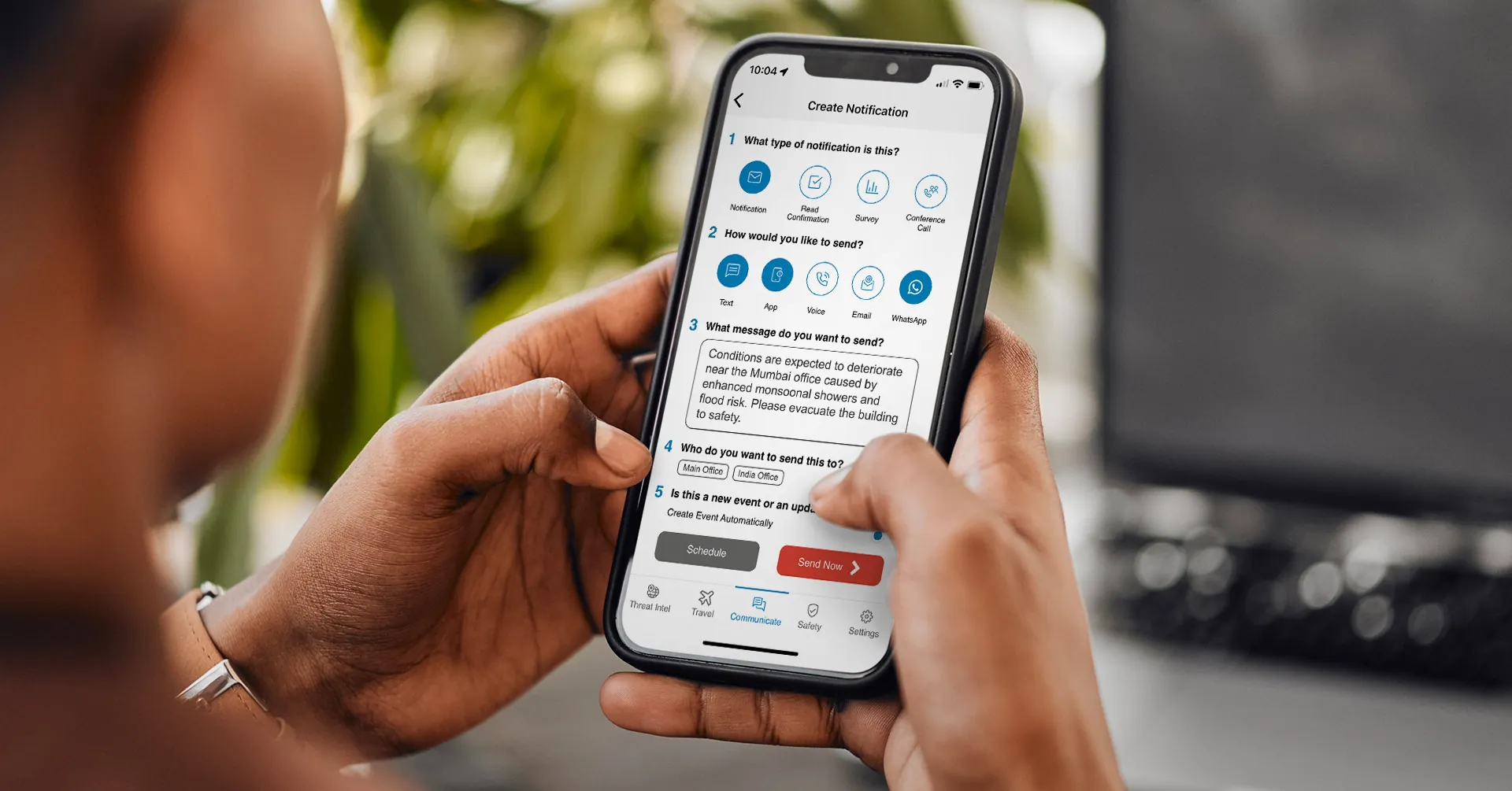
The notification goes out through AlertMedia’s multichannel delivery—SMS, email, voice, mobile app, desktop, Teams, Slack, and WhatsApp—so it reaches employees wherever they are working.
Confirm who is safe
Two-way communication lets affected employees confirm their status or request help, giving the response team a real-time read on who still needs outreach.
What to Look for in a Geofenced Notification Capability
| Capability | Why It Matters |
| Map-based boundary drawing, not just predefined zones | Real incidents rarely match the boundaries of an org chart or a pre-set radius; the ability to draw a custom shape matters. |
| Dynamic, HRIS-synced audience groups | Static lists go stale the moment someone changes location or role; dynamic groups stay current automatically. |
| Multichannel delivery to the geofenced group | Identifying the right people only matters if the notification actually reaches them, across the channels they use. |
| Two-way confirmation | Knowing who was notified is different from knowing who is safe; read confirmations and status checks close that gap. |
| A single workflow from targeting to send | Switching between a separate mapping tool and a separate notification tool adds delay in the minutes that matter most. |
How AlertMedia Approaches Geofenced Mass Notification
AlertMedia’s Emergency Communication is built around identifying the right audience and reaching them fast, across whatever channel they are using at the moment an incident occurs.
| Need | How AlertMedia Helps |
| Geographic targeting | Visual Intelligence lets admins draw affected areas directly on a live map and identify employees within that boundary. |
| Audience accuracy over time | Dynamic User Groups auto-populate from HRIS-synced location and role data, so geofenced groups reflect the current workforce, not a static snapshot. |
| Multichannel reach | Notifications sent to a geofenced group deliver across SMS, email, voice, mobile app, desktop, Teams, Slack, and WhatsApp from a single send. |
| Confirming safety, not just delivery | Two-way communication lets affected employees confirm their status or request help directly from the notification. |
| Speed from targeting to send | Geofencing, audience identification, and multichannel delivery live in the same Simple 5-Step Notification Creation workflow—no separate mapping tool required. |
More than 3,500 organizations across 150+ countries use AlertMedia’s Emergency Communication, with customers reporting response times 25+ minutes faster and new admins trained on the platform in roughly 20 minutes. AlertMedia has also been named a Gartner Peer Insights™ Customers’ Choice.
Frequently Asked Questions
- What is a mass notification system with geofenced alerts? A mass notification system with geofenced alerts lets an administrator draw a geographic boundary around an affected location and automatically identify and notify every employee within it, rather than manually building a recipient list for each incident.
- How does geofencing target the right employees during an incident? AlertMedia's Visual Intelligence lets admins draw a custom boundary on a live map. Dynamic User Groups, built from HRIS-synced location and role data, automatically populate with the employees inside that boundary, so the notification goes to the people actually affected.
- Can geofenced alerts reach employees across multiple channels? Yes. Once a geofenced group is identified, AlertMedia's multichannel delivery sends the notification across SMS, email, voice, mobile app, desktop, Teams, Slack, and WhatsApp in a single send.
- How is geofencing different from manually selecting notification groups? Manual selection requires an admin to cross-reference rosters or directories to build a list, which takes time and can go stale as the workforce changes. Geofencing identifies the affected audience automatically based on a drawn boundary and current location data, with no manual list-building required.
- Does geofencing work for organizations with multiple facilities or campuses? Yes. Geofencing is designed for organizations with distributed footprints—multiple offices, warehouses, retail locations, or campuses—where manually tracking who is where at any given moment is impractical for a lean team.
- What is Visual Intelligence and how does it relate to geofencing? Visual Intelligence is the mapping feature that underlies map-based context and targeting across the AlertMedia Platform. Inside Emergency Communication, Visual Intelligence powers the geofencing capability that lets admins draw boundaries and identify affected employees on a live map.
Reach the Right People, Automatically
A distribution list tells you who was on the roster last time someone updated it. A geofence tells you who is actually there right now. AlertMedia’s Emergency Communication combines the two — Visual Intelligence for targeting, multichannel delivery for reach, and two-way communication for confirmation—all in a single notification workflow.
Download Our Emergency Communications Key Feature Guide
Explore how you can protect your people and business with AlertMedia’s secure, two-way, AI-powered, multichannel notifications.

AlertMedia, Risk Intelligence and Response