
Deepfakes, synthetic audio, fabricated press releases—AI misinformation is a documented business risk. This guide covers how to detect it, verify before you act, and respond when it counts.

Emergency Management Jun 12, 2026
AI Misinformation: A Business Guide to Spotting and Responding to AI-Generated False Content
Definitive Guide to Misinformation & Disinformation
Detect, verify, and contain information threats before they cause real-world harm.
A deepfake video of your CEO announces your company is being investigated for fraud. Employees are already forwarding it, shareholders are calling their brokers, and your stock is moving—all before your team has even seen it. This is not the plot of a Hollywood movie. It’s the kind of incident security and crisis communication teams are already navigating.
False information has always existed. What’s changed is the barrier to entry. Now that anyone can use ChatGPT or similar generative AI tools, it’s faster, cheaper, and easier to produce convincing synthetic content at scale—and harder for the people encountering it to question what they’re seeing.
This guide covers what AI misinformation is, how it’s changing the global risk landscape, how to detect it, and what to do when it hits.
Definitive Guide to Misinformation & Disinformation
Detect, verify, and contain information threats before they cause real-world harm.
What Is AI Misinformation?
AI misinformation is false or misleading information created, altered, or spread with the help of AI, such as large language models (LLMs) and image generation tools. Fake content often includes text, images, audio, or video, and is becoming increasingly difficult to distinguish from authentic content.
Misinformation, disinformation, and malinformation are related but distinct threats. Understanding the difference shapes how you respond.
- Misinformation: False or misleading information, usually shared without intent to harm
(Example: Someone shares a fake news story in an internal Slack channel because they believe it.)
- Disinformation: False information deliberately created and spread to deceive or cause harm
(Example: A fabricated press release attributed to your company circulates online, triggering a flurry of media inquiries before your comms team has even seen it.)
- Malinformation: Genuine information that is true but used maliciously
(Example: Leaked private data is made public to embarrass or threaten a high-profile individual.)
AI can be used for all three, but it’s especially powerful for amplifying disinformation and making it look credible.
Why AI Misinformation Is a Real-World Business Problem
Total financial losses from deepfake-enabled fraud exceeded $200 million in the first quarter of 2025 alone. The AI systems driving that damage are accessible, inexpensive, and they’re improving every day. As automation and the use of AI become more widespread, the risk expands—and the business consequences are already documented across industries.
Reputational damage and brand impersonation
AI-powered misinformation, such as a deepfake video or fabricated article, can make your organization look reckless or fraudulent before your comms team has had a chance to respond. At that point, the damage isn’t just to your brand—it’s to the credibility of every official statement you make afterward.
Correcting the record is time-consuming and expensive. According to Regula’s Deepfake Trends report, businesses across industries incurred an average loss of nearly $450,000 per deepfake incident.
Financial fraud and social engineering
In 2024, a finance employee at engineering firm Arup authorized a series of wire transfers totaling approximately US$25 million after joining what appeared to be a legitimate video call with senior leadership. Every person on that call was a deepfake. The fraud wasn’t discovered until the employee followed up with Arup’s actual headquarters afterward.
Incidents like this are why a business impact analysis should account for AI-driven fraud scenarios, not just operational outages.
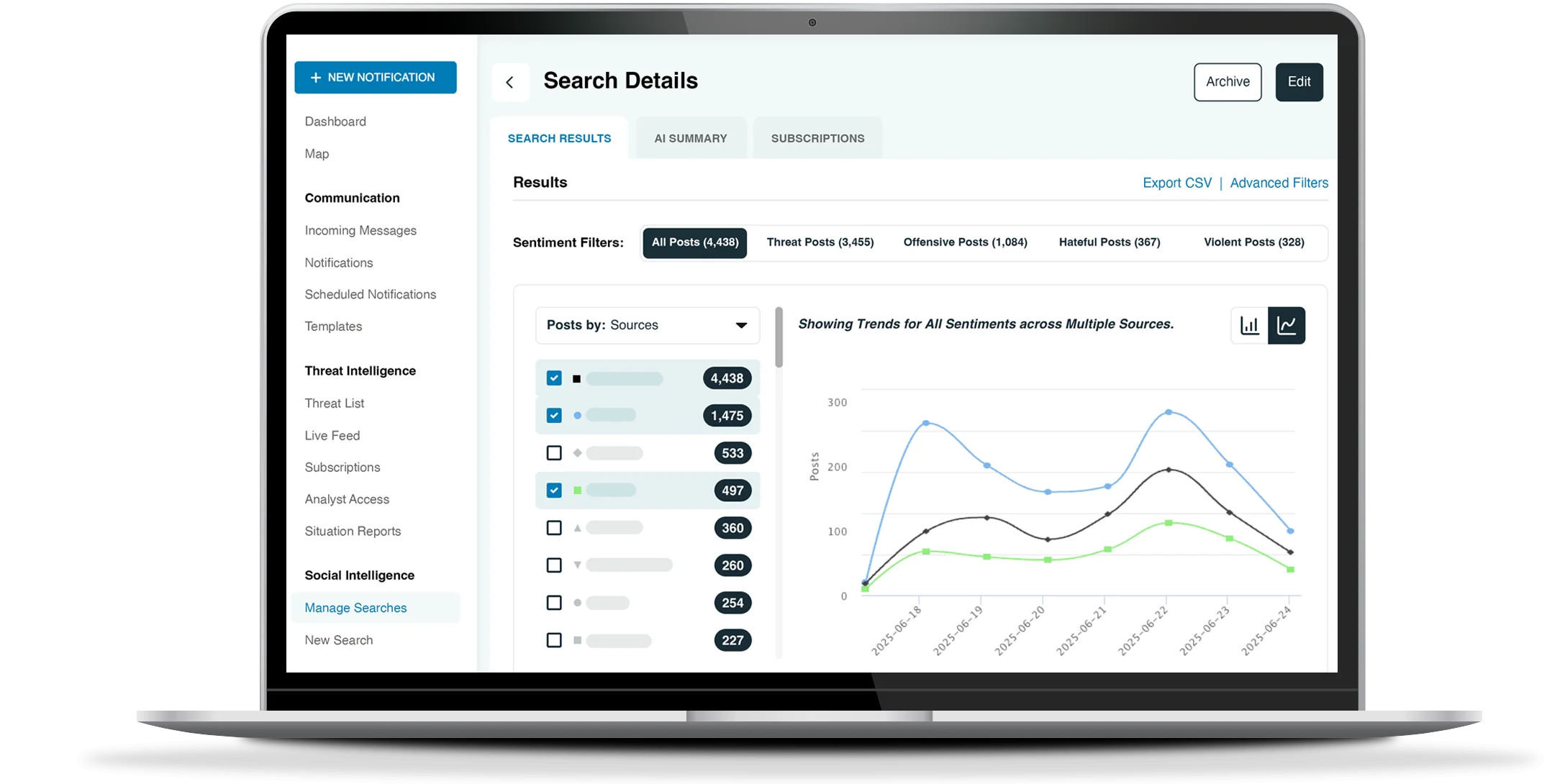
AlertMedia Social Intelligence
Uncover potential threats with advanced social media monitoring and filtering built for security teams.
Market manipulation and stock volatility
AI-generated content can move markets before anyone has time to verify what’s real. In 2023, a fabricated image depicting smoke near a prominent building spread quickly enough to spook investors and send stock prices falling—before the image was confirmed as fake. The financial damage was done before the correction could catch up.
Employee confusion and operational disruption
When false information reaches employees during an active incident, the operational impact can be immediate. Instead of responding to the actual event, teams are managing delayed decisions, broken approval chains, and confusion—both internally and with customers. It’s a corporate risk management challenge as much as a communications one.
Sara Pratley, SVP of Global Intelligence at AlertMedia, has seen it firsthand: “We can certainly see that the generation of brand logos or even leadership likeness…can lead to everything from false safety alerts to fake cancellations.”
How to Spot AI-Generated Content
We’ve come a long way since the “Will Smith eating spaghetti” era of obviously glitchy AI video—and AI-generated content will only get harder to spot. There’s no single test that catches everything, and the tells below will evolve (treat them as a starting point, not a permanent checklist). But a working familiarity with the red flags across content types serves an important function: slowing down reaction long enough to verify before you act.
Much of this content first surfaces and spreads on social media platforms—making social media threat monitoring an important early warning layer for security and comms teams.
Visual red flags in deepfake images and video
AI image and video generation has improved dramatically, but telltale signs remain—especially under scrutiny:
- Blurry or unnatural edges around faces, hair, or background objects
- Inconsistent lighting or shadows between the subject and the background
- Distorted anatomy, such as extra fingers, misaligned teeth, warped lips, or mismatched eyes
- Stiff or jerky movement, unnatural blinking, or lip-sync that doesn’t align with the audio
When evaluating video, slow it down. Artifacts that pass at normal speed often become obvious at half speed or when paused.
Synthetic text patterns worth knowing
Surely you’ve seen the LinkedIn posts calling out em dashes or the rule of three as markers of AI-generated text. The real signals go deeper. AI-generated text is harder to flag by feel alone, but patterns emerge once you know what to look for:
- Overly smooth, generic tone—technically fluent but lacking a real point of view
- Repetitive phrasing, odd conjunctions, or vague sentences that seem confident but don’t say much
- Fact-like claims with no sourcing, or details (dates, names, statistics) that are confidently wrong
- Subtle stylistic ticks that don’t match the real person’s usual writing, like a specific word or punctuation pattern used repeatedly
What matters more than any single quirk is the overall pattern. Does the writing feel like a specific person wrote it, or does it feel like the average of a thousand people did?
What to listen for in voice clones and audio spoofs
Voice cloning tools are now very accessible and increasingly realistic.
Potential red flags include:
- Unnatural prosody, which could mean a too-steady rhythm, missing breath sounds, or robotic pauses between words
- Emotional mismatch—for example, a calm, flat delivery on content that should carry urgency or stress
- Subtle distortions in tone, pitch, or background noise that feel slightly too clean or artificially cut
Trust your instincts here. If something sounds “off” and you can’t place why, it’s worth a second look before you forward or act on it.
Pro tip: Use provenance signals as a safety check
Before accepting any content at face value, check for metadata, platform labels, or Content Credentials issued under the C2PA standard that identify who created or edited the content and whether AI tools were involved. In some cases, watermarking can help recover provenance data if metadata is stripped, but it is not the same thing as C2PA itself.
These signals aren’t foolproof, but they add a meaningful layer of verification, especially for high-stakes content.
Get The Definitive Guide to Misinformation & Disinformation
Verify Before You Respond: How and Why
Spotting the red flags buys you time, and what you do with that time matters.
In an active incident, the pressure to respond fast is real. But a response built on unverified information can make a situation harder to manage, not easier. A false escalation, a premature denial, or an internal alert based on fabricated content all have real operational costs.
Think of verification less as a fact-checking exercise and more as a short, repeatable protocol your teams run before they escalate, publish, brief leadership, or respond publicly.
Stop and SIFT
The SIFT method is a practical four-step filter worth building into your incident workflows. It’s not designed to be exhaustive, but rather fast enough that people will actually use it under pressure.
- Stop. If a piece of content triggers urgency or alarm, that’s your signal to pause, not react. Ask: Do we know this source? Have we seen this claim from anyone we trust?
- Investigate the source. Look at who is posting or sending the content—techniques from open source intelligence analysis can help your security team go deeper when a source looks suspicious.
- Find better coverage. Search for the same claim from sources your organization already treats as reliable—like industry associations, regulators, and other official channels. If no credible source is confirming it, treat it as unverified until one does.
- Trace to the original. Follow the chain back to the source document, video, press release, or dataset. This step catches the most common manipulation tactic: real content stripped of context, clipped, or reframed to mean something it didn’t.
SIFT has practical benefits across the entire org. For security and business continuity teams, SIFT works well as an intake filter for screenshots, forwarded messages, and viral posts about outages, breaches, or safety incidents. For comms, it functions as a gate before any external statement goes out. For legal and risk, it creates a documented verification trail—clear evidence that your team exercised reasonable diligence before acting.
Use reverse search for visual content
For images and video, reverse search is your fastest verification tool. Upload a frame or image to a reverse video search tool, and it will show you where that content has appeared online and when. This often reveals whether a supposedly breaking image is actually recycled footage from years ago, or whether a “screenshot” has been edited.
Give comms and security teams access to at least one approved reverse video search tool, and write it into your crisis management plan as a standard step for any suspicious visual.
Build your trusted source network before you need it
When something breaks, you shouldn’t be deciding in the moment who to believe. A pre-agreed, cross-functional list of trusted sources—such as regulators, key industry bodies, credible media outlets, law enforcement contacts, and open source intelligence partners—gives your teams a foundation they can lean on under pressure.
“It’s particularly important for all of us to have our trusted sources of information…like security, corporate comms, business continuity teams,” noted Pratley. With this approach, “there’s an expectation set really early for where information is going to come from.”
Align on this list across security, PR, legal, and business continuity, and make sure it’s specific. Instead of “check reputable sources,” lean more towards, “For claims about X type of incident, check A, B, and C before escalation.”
How to Respond to AI When AI Misinformation Strikes
How well your organization handles AI-generated misinformation depends largely on decisions made before an incident occurs—who owns the response, what gets communicated and when, and how quickly your teams can move without improvising under pressure.
“Sharing and creating awareness very quickly is important because things can spread like wildfire. So you want to get ahead of it, even if just internally with key stakeholders. You can be transparent by saying, ‘Here’s what we have, here are the questions we’re asking, and this is why I’m bringing this to you—because if this situation evolves, we foresee the following impacts.’”Sara Pratley SVP of Global Intelligence at AlertMedia

Establish a rapid response protocol
Treat AI-driven misinformation like any other operational crisis. That means appointing a cross-functional response team including (at a minimum) comms, legal, security, and PR, with pre-defined escalation paths and pre-approved message templates ready to go before you need them.
The organizations best positioned to respond quickly are those that have already invested in AI risk management, mapped risks, run scenario drills, and assigned clear ownership before an event occurs. When a deepfake, conspiracy theory, or fabricated story surfaces, you shouldn’t have to waste time deciding “who handles this?”
Train employees on process, not detection
Detection is a starting point, not a finish line. Employees who know the red flags still need to know what to do next—who to notify, how to slow the dissemination of falsehoods, and where to direct questions while the situation is being assessed.
Train staff on three things:
- Who to notify when something looks suspicious
- How to pause before forwarding or sharing unverified content
- How to direct questions through official channels rather than filling the gap with speculation
The goal is to make sure suspicious content reaches the right people quickly, before it spreads further.
Communicate with stakeholders during a misinformation crisis
Once you’ve confirmed the basics, communicate quickly and consistently—even if you don’t have the full picture yet. Share what you know, what you don’t know, and what you’re doing to find out. Then repeat that core message consistently across internal comms, public statements, and social channels.
Uncertainty is where misinformation takes hold. Clear, frequent communication from leadership reduces the vacuum that unverified content fills. If employees and stakeholders know where to find accurate information, they’re less likely to look elsewhere.
Know when to engage platforms and legal counsel
If, for example, a deepfake of an executive is spreading on LinkedIn, TikTok, or YouTube, report it directly to the platform’s trust-and-safety team—not just through standard content reporting. Organizations that have pre-built those relationships move faster when it counts.
On the legal side, involve counsel early if AI-generated content creates defamation exposure, regulatory risk, or reputational damage that could spread. The time to bring in legal is before a situation escalates, not after.
Staying Ahead of AI Misinformation
AI misinformation is evolving faster than any single checklist can keep up with. But if you build detection, verification, and response into your threat management playbook now—before an incident hits, you’ll be far better positioned to protect your people, your brand, and your operations when it matters most.
Definitive Guide to Misinformation & Disinformation
Detect, verify, and contain information threats before they cause real-world harm.

AlertMedia, Risk Intelligence and Response


More Articles You May Be Interested In
-
 Emergency ManagementSocial Media Misinformation: A Growing Threat to Business Operations
 -
 Emergency Management, Safety and SecurityDisinformation Security and Resilience: The Speed-to-Truth Framework
 -
 Safety and SecuritySocial Media Threat Monitoring for Executive Security: From Online Threats to Real-World Risk
