By AlertMedia, Risk Intelligence and Response

Uncategorized Jun 05, 2026
Mass Notification for Distributed and Remote Workforces
Emergency Communications Key Feature Guide
Explore how you can protect your people and business with AlertMedia’s secure, two-way, AI-powered, multichannel notifications.
Table of Contents
Mass notification for distributed and remote workforces is the practice of reaching every employee—regardless of location, time zone, device, or work arrangement—with time-sensitive communications during an incident. Unlike traditional emergency communication built around a centralized office, distributed workforce notification requires multichannel delivery, dynamic audience targeting, and two-way confirmation capabilities that work whether employees are at a headquarters, a remote home office, a field site, or in transit. For organizations with employees spread across geographies, the ability to find and confirm every person quickly is the difference between a coordinated response and a communication failure.
Why Distributed and Remote Workforces Create Unique Communication Challenges
No single channel reaches everyone
A workforce spread across locations, time zones, and work arrangements means no single communication channel is reliable for every employee. The person in a corporate office may see a desktop notification instantly. The field technician may only check SMS. The remote employee in a different country may rely on WhatsApp. A mass notification system that delivers on one or two channels will miss portions of a distributed workforce when it matters most.
Static contact lists go stale fast
Remote and hybrid workforce compositions change constantly—employees change roles, relocate, join teams, and leave. Organizations that rely on manually maintained contact lists for emergency communication find that data accuracy degrades quickly. When an incident occurs, outdated lists mean missed notifications and gaps in accountability.
Accountability without a physical headcount is harder
In an office, confirming that employees received and understood a notification can be as simple as a physical check-in. In a distributed workforce, security and business continuity leaders have no equivalent. Without two-way communication capabilities—read confirmations, response surveys, and free-text check-ins—it is difficult to determine who is safe, who needs assistance, and who hasn’t responded.
Multilingual teams require language-aware communication
Distributed workforces are often multilingual. A single notification in one language may leave portions of the workforce without the information they need to respond safely. This is especially true in global organizations or those with large populations of employees whose first language is not English.
Key Elements of Effective Mass Notification for a Distributed Workforce
| Component | What It Means | Why It Matters |
|---|---|---|
| Multichannel delivery | Notifications delivered across SMS, email, voice, mobile app, desktop, Teams, Slack, and WhatsApp from one workflow | Distributed employees are reached wherever they are—no single channel is sufficient |
| Dynamic audience targeting | Recipient groups built from live workforce data (role, location, region, department) that update automatically | Eliminates manual list maintenance and targeting errors during high-stress incidents |
| Two-way communication | Read confirmations, structured surveys, and free-text response options | Surfaces who has acknowledged the notification and who needs follow-up—without a physical rollcall |
| Automatic message translation | One notification composed in a source language, delivered to recipients in their preferred language | Reaches multilingual workforces without separate workflows or delayed sends |
| HRIS data integration | Direct sync with HR systems to maintain accurate, current contact data | Contact records stay current as the workforce changes—no manual reconciliation |
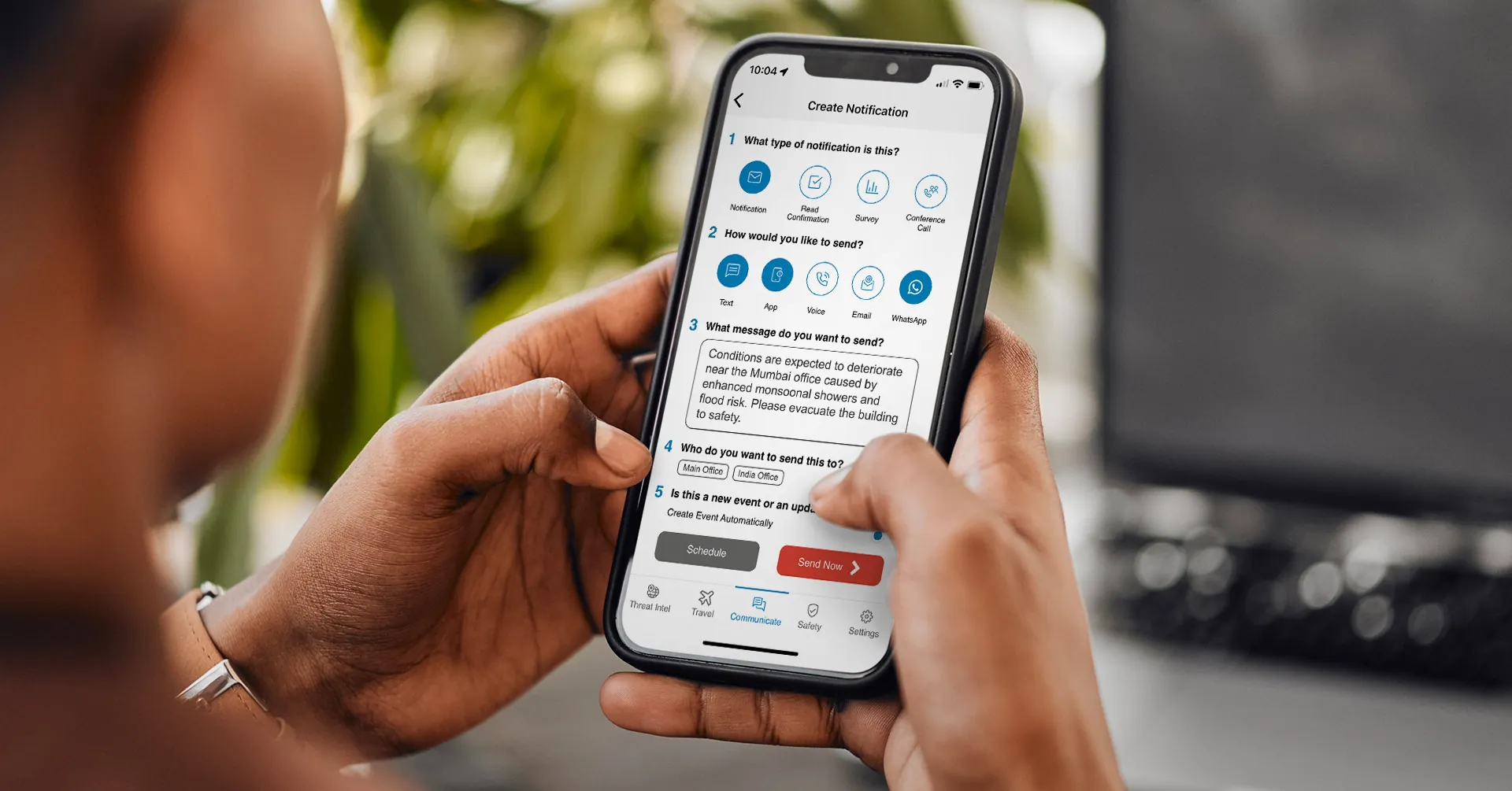
| Mobile send capability | Admins can compose and send from a mobile device | Enables response initiation even when admins are not at a desk or in an office |
| Real-time delivery reporting | Live view of delivery status, open rates, and response rates | Lets communicators identify gaps in real time and take action before the window closes |
How Mass Notification Works for a Distributed Workforce
Step 1: Identify who is affected
Effective mass notification begins with knowing which employees are impacted. For distributed workforces, this means targeting by location, time zone, region, or any other attribute captured in the organization’s HR system—not just selecting “all employees.” Accurate, current data is the prerequisite for targeted communication.
Step 2: Compose the notification
Communicators create an actionable notification with clear instructions for what employees should do next. For multilingual workforces, this step includes selecting which languages the notification should be delivered in—a capable system handles translation automatically from a single composed message.
Step 3: Select delivery channels
Distributed employees are reached by selecting all relevant channels in parallel: SMS, email, voice, mobile app, desktop, Teams, Slack, WhatsApp. Selecting multiple channels is how organizations ensure the message lands wherever employees are working, regardless of what they happen to be doing at the moment.
Step 4: Send and monitor delivery
Once sent, admins monitor delivery in real time. A live dashboard surfaces how many notifications have been delivered, opened, and responded to—and flags employees who have not yet acknowledged. For a distributed workforce, this visibility replaces the situational awareness that a physical office environment provides naturally.
Step 5: Collect responses and identify who needs help
Two-way communication capabilities collect employee responses: confirmation of safety, requests for assistance, or free-text information. This step is how organizations close the accountability loop on a distributed workforce without a physical check-in process.
Step 6: Continue communications through resolution
For longer-duration incidents, ongoing communication keeps employees informed as the situation evolves. Event pages or centralized resource hubs give distributed employees a single place to check for updates, instructions, and status information without requiring the communications team to push a new notification for every update.
Best Practices for Mass Notification Across Distributed Teams
- Sync contact data continuously from your HR system so recipient groups are always current when an incident occurs.
- Build pre-configured notification templates for your most common incident scenarios so there is no drafting time under pressure.
- Define audience segments by location, region, role, and language preference in advance—not at the moment of send.
- Enable multichannel delivery as the default, not an exception; a distributed workforce has no single reliable channel.
- Train multiple admins to send notifications from mobile devices so communication initiation is never dependent on someone being at a desk.
- Require read confirmations and structured responses for all employee safety notifications, not just informational updates.
- Review delivery and response data after every incident—response rate by channel is the most actionable metric for a distributed workforce.
- Test your notification system with distributed employees across time zones at least twice per year to surface coverage gaps before a real incident.
Common challenges—and how to address them
| Challenge | Why it happens | How to address it |
|---|---|---|
| Low response rates from remote employees | Remote employees are harder to reach at a moment’s notice; single-channel delivery misses those not on that channel at the time | Enable multichannel delivery and require read confirmations so low-response employees are flagged for follow-up automatically |
| Contact data that doesn’t reflect current workforce | Manual list management can’t keep pace with a changing distributed workforce | Integrate directly with the HR system and use dynamic groups that update from live workforce data |
| Admins can’t initiate a send when they’re away from a desk | Desktop-only interfaces assume admins are in an office during an incident | Use a system with full mobile send capability so any authorized admin can initiate communication from any location |
| Single-language notifications leave portions of the workforce underinformed | Organizations default to one language because translation workflows are slow or manual | Use a system with built-in Automatic Message Translation that delivers in each employee’s preferred language from a single composed notification |
How AlertMedia Approaches Mass Notification for Distributed and Remote Workforces
AlertMedia’s Emergency Communication solution is built for the reality of today’s distributed workforce—multichannel, two-way, and designed to find the right people wherever they are working. With 3,500+ customers across 150+ countries protecting 13M+ users, AlertMedia has processed notifications at scale across every kind of workforce configuration.
| What distributed workforces need | How AlertMedia’s Emergency Communication helps |
|---|---|
| Multichannel delivery | Notifications delivered across SMS, email, voice, mobile app, desktop, Teams, Slack, and WhatsApp from one workflow—no separate sends per channel |
| Dynamic, accurate audience targeting | Dynamic User Groups built from any HRIS data field; direct integration with major HR systems keeps contact data current automatically |
| Two-way accountability | Read confirmations, survey responses, and free-text replies surface who has acknowledged the notification and who needs follow-up |
| Multilingual workforce reach | Automatic Message Translation delivers notifications in each employee’s preferred language from a single composed message—no separate workflows |
| Fast send under pressure | A simple five-step notification creation process and pre-built templates with company-defined variables mean admins can initiate a send in minutes—organizations respond 25+ minutes faster |
| Mobile-first administration | Full notification creation and send from the AlertMedia mobile app—authorized admins initiate communications from any location, any device |
| Ongoing incident coordination | Event pages centralize communications, updates, and resources during longer-duration incidents so distributed employees have one place to check |
AI-powered drafting and translation
AlertMedia’s AI Assistant supports the send process from inside the Emergency Communication workflow. Admins use AI Assistant to draft notifications from scratch, refine existing messages for clarity, and initiate translation into multiple languages—all before hitting send. For distributed workforces where speed and language accuracy both matter, AI Assistant reduces drafting time without requiring a separate workflow step.
Delivery visibility when it matters most
AlertMedia’s real-time Delivery Insights and Reporting give communicators a live view of delivery status, open rates, and response rates across all channels and all recipients. For a distributed workforce, this is the situational awareness equivalent of a physical rollcall—updated in real time, accessible from any device.
Frequently Asked Questions
- What is mass notification for distributed and remote workforces? Mass notification for distributed and remote workforces is the practice of reaching every employee—regardless of location, device, or work arrangement—with time-sensitive communications during an incident. Effective systems deliver across multiple channels simultaneously, use dynamic audience targeting to identify impacted individuals, and collect two-way responses to confirm receipt and identify who needs assistance. For organizations with employees spread across geographies, this capability is a core component of incident preparedness.
- What communication channels should a mass notification system support for distributed teams? A distributed workforce has no single reliable channel, so an effective system should deliver across all the channels where employees are reachable: SMS, email, voice calls, mobile app push notifications, desktop notifications, and conversational channels such as Microsoft Teams, Slack, and WhatsApp. Sending across all channels in parallel—from one workflow—is how organizations ensure the notification reaches employees regardless of what they are doing or where they are at the moment.
- How do you confirm that remote employees received and acknowledged an emergency notification? Two-way communication capabilities close the accountability loop. Read confirmations surface which employees have opened a notification; structured response surveys and free-text reply options collect acknowledgment or safety status from each recipient. Admins monitor responses in real time and can identify non-responders for follow-up. This replaces the situational awareness that a physical office provides through visual confirmation.
- How do you keep contact data accurate for a distributed workforce? The most reliable approach is a direct integration between the mass notification system and the organization's HR system. Live data sync means that as employees change roles, locations, or departments, the corresponding contact records and audience groups update automatically. Dynamic groups built from HR data fields eliminate the need for manual list management and ensure targeting accuracy when an incident occurs.
- How does AlertMedia handle multilingual distributed teams? AlertMedia's Automatic Message Translation delivers notifications in each employee's preferred language from a single composed message. Admins compose one notification—AlertMedia handles the translation and delivers to recipients in their individual language preference. For organizations with large multilingual workforces, this eliminates the delay and complexity of maintaining separate notification workflows per language.
- How does mass notification differ from a general employee communication platform? Mass notification is optimized for time-sensitive, high-stakes incident communication—speed, delivery reliability, multichannel reach, and two-way accountability under pressure. General employee communication platforms (intranets, internal social tools, project management software) are built for day-to-day collaboration and are not designed for the throughput, reliability, or two-way confirmation requirements of emergency communication. Organizations should maintain both—general tools for ongoing communication and a dedicated system for incident notification.
- Who typically owns mass notification for a distributed workforce? Ownership varies by organization, but the function typically sits with Corporate Security, Business Continuity, or HR / People Operations. In organizations with a dedicated security or resilience function, those teams configure the system and manage incident-driven sends. HR and People Operations teams often use the same system for operational notifications—weather closures, facility changes, shift updates—alongside incident communication. The most effective programs establish shared administration across these functions with defined send permissions.
Download Our Emergency Communications Key Feature Guide
Explore how you can protect your people and business with AlertMedia’s secure, two-way, AI-powered, multichannel notifications.
AlertMedia, Risk Intelligence and Response