

Top Emergency Alert Systems for Business in 2026
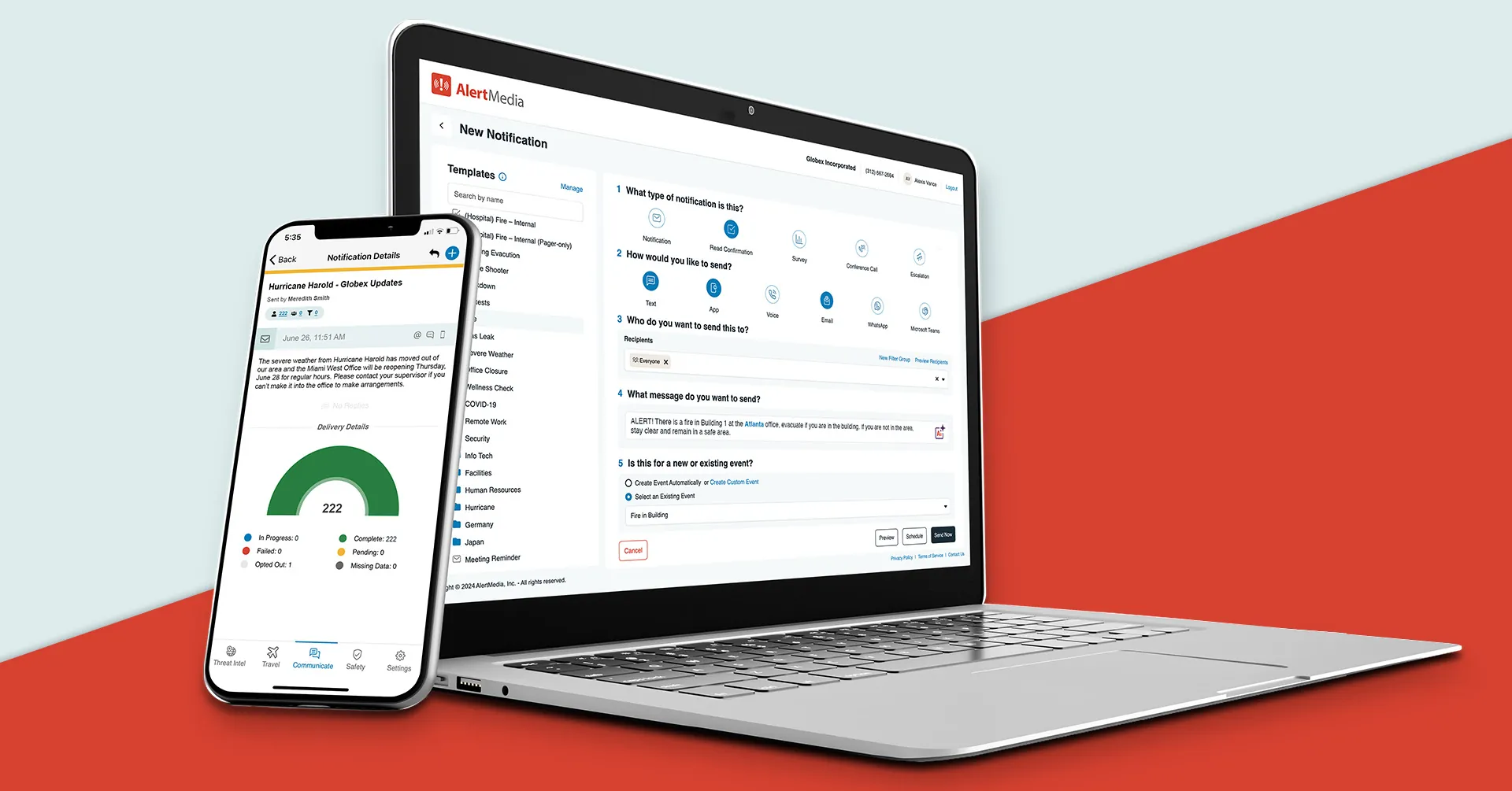
Channel failure is predictable—design for it. Severe weather doesn’t give advance notice, utility outages don’t check your communication readiness, and the gap between “we have a plan” and “we can execute it” almost always comes down to whether the right people received the right message in time. Emergency alert systems give businesses a dependable way to close that gap—replacing ad hoc phone trees, group emails, and fragmented communication with a single platform that reaches every employee simultaneously, across every available channel. This guide evaluates the leading options and helps businesses of all sizes find the right fit.
What Is an Emergency Alert System for Business?
An emergency alert system for businesses is a software platform that enables organizations to quickly and reliably send urgent notifications to employees, contractors, and other stakeholders across multiple communication channels simultaneously. Unlike public emergency alert systems operated by governments and municipalities, business emergency alert systems are purpose-built for organizational communication: reaching your specific people with specific messages in specific situations.
Modern business emergency alert systems go well beyond a broadcast tool. They combine multichannel message delivery with contact management, threat monitoring, two-way communication, and post-incident documentation in a single platform. Common use cases include:
- Severe weather warnings and site closure notifications
- Evacuation and shelter-in-place instructions
- Utility outages affecting facility operations
- Active threat and workplace violence response
- IT or operational system failures requiring immediate staff awareness
- After-hours safety check-ins for field or on-call staff
- Compliance-driven safety drills and test notifications
The key distinction between a business emergency alert system and simpler alternatives—group texts, email blasts, phone trees—is reliability and accountability under pressure. These platforms are built to deliver when it matters, track whether recipients received and acknowledged messages, and produce the records that safety and compliance programs require.
Who uses these systems?
Emergency alert systems for business are used across industries wherever employee safety, regulatory compliance, or operational continuity depends on fast, reliable communication during unplanned events.
- EH&S and workplace safety teams rely on them as the communication layer for safety programs—sending pre-authorized alerts during incidents, documenting required compliance notifications, and managing drills without the manual overhead of coordination.
- Facilities and operations managers at multi-site businesses use them to coordinate closures, maintenance emergencies, and utility disruptions across locations without resorting to phone chains that break down at the worst moments.
- Companies with frontline and field workforces in construction, utilities, field services, and logistics depend on them to reach employees who aren’t at desks, don’t check email regularly, and can’t be assumed to be reachable through any single channel.
- Mid-market businesses formalizing safety programs turn to these platforms when their headcount or footprint has grown past what informal communication processes can handle—or when an incident reveals the gap.
- Organizations in weather-exposed industries such as agriculture, outdoor events, transportation, and energy production need automated weather monitoring and alert triggering to reduce the manual monitoring burden on already stretched teams.
- Property management and real estate companies use them to notify tenants, on-site staff, and maintenance crews about emergencies across portfolios of buildings they don’t fully control.
Across all these contexts, the driver is the same: when an emergency or disruption occurs, the cost of not having a reliable alert system becomes immediately apparent.
The Business Case for Emergency Alert Systems
For most businesses, the decision to invest in an emergency alert system is driven by one of three things: a near-miss, a compliance requirement, or an incident they wish they’d handled better. The financial case is straightforward once those experiences are on the table.
- Replace costly manual processes: Phone trees require people to be available, awake, and reachable—and they break down exactly when demand is highest. An automated alert system eliminates the administrative labor of manual emergency outreach and executes faster.
- Reduce OSHA exposure: Documented, timestamped proof that employees were notified of hazards, given evacuation instructions, or received safety-required communications is a direct input to OSHA recordkeeping and defense against workplace safety citations.
- Lower litigation liability: When an employee is injured during an incident, the question of whether they were properly warned is often central. Delivery logs and acknowledgment records provide concrete evidence that the organization met its duty of care obligations.
- Contain weather- and disruption-related costs: Fast, accurate notifications about closures, utility outages, or hazardous conditions reduce unplanned labor costs, prevent employees from traveling to closed sites, and limit the downstream costs of uncoordinated responses.
- Protect employee trust: People notice when their employer communicates clearly during a crisis—and when they don’t. Reliable emergency communication is a visible signal that the organization takes safety seriously, which affects retention and workplace culture over time.
Choosing a tool is easy; operationalizing it is harder. The real return on an emergency alert system comes from a platform that your team will actually use correctly—reliably, quickly, and without hesitation—when a real event is unfolding.
Core Capabilities to Evaluate
Not all emergency alert systems are built for the realities of business operations. The following capabilities set platforms that perform in real conditions apart from those that only look good in a demo.
- Pre-configured scenario templates: Ready-to-use messages for the emergencies most likely to affect your business—severe weather, evacuation, shelter-in-place, utility outage, and operational closure—so your team isn’t writing communications from scratch when an incident is already in progress
- Automated weather and threat monitoring: Built-in monitoring that watches for conditions at your specific locations and triggers alerts automatically when thresholds are crossed, without requiring someone to watch a weather app around the clock
- Multichannel delivery without app dependency: SMS and voice as baseline channels that reach employees on any phone, including personal devices, without requiring an app download—because not every employee, contractor, or site worker will have a corporate app installed
- Two-way check-in and response tracking: The ability to collect employee acknowledgments and safety confirmations after an alert goes out—so you know who has responded, who hasn’t, and who may need follow-up
- Location-based alerting for multi-site organizations: The ability to send alerts to employees at a specific location, building, or region without notifying the entire company about an incident that doesn’t affect them
- Mobile send capability for administrators: Admins must be able to initiate an alert from their phone, not just from a desktop, because the person responsible for sending the alert may be managing the incident themselves
- Scheduled drills and test sends: Built-in support for periodic test notifications that verify the system works, keep employees familiar with how alerts look and feel, and satisfy safety program drill requirements
- HRIS and directory integration: Automatic contact data sync from your HR system or identity provider, so recipient lists stay current without manual maintenance as employees join, leave, or change roles
- Compliance-ready audit documentation: Timestamped delivery records and response logs formatted for OSHA recordkeeping, insurance requests, or post-incident review—not just raw system data
- Visitor and contractor reach: The ability to alert people on-site who aren’t in your employee directory, including third-party workers, vendors, and visitors who may be in harm’s way during an incident
- Configurable sending permissions: Clear controls over who is authorized to send alerts, at what level of urgency, and under which circumstances—preventing unauthorized sends while ensuring authorized senders aren’t blocked by ambiguity
- Pathway to expanded capability: For businesses that grow into more complex needs, the ability to add incident management, travel risk monitoring, or employee safety features without switching platforms
Comparison Overview of Leading Emergency Alert Systems
The emergency alert system market spans platforms built for Fortune 500 enterprise programs and those designed for businesses deploying a system for the first time. Understanding which tier fits your organization’s actual requirements—not just the most feature-rich option on the market—is the starting point for a good decision.
Tier 1: Core Providers
Full-featured platforms with the delivery reliability, integration depth, and scalability to support serious business emergency communication programs—from growing mid-market companies to large enterprises. These are the vendors most likely to be on any well-qualified shortlist.
- AlertMedia — Fast to deploy and built for everyday usability: multichannel emergency alerting, automated weather and threat triggers, two-way check-ins, and a unified safety platform that grows with your business
- Everbridge — Enterprise-scale critical event management with global reach and deep feature breadth; often requires dedicated program staff to deploy and manage effectively
- OnSolve (Crisis24) — Pairs emergency alerting with AI-driven risk intelligence; particularly suited to organizations monitoring natural hazards and international threats
- Singlewire / InformaCast — Specializes in facility-wide alerting through IP phones, overhead speakers, and digital signage; widely used in campus and fixed-site industrial environments
- BlackBerry AtHoc — Government and defense-pedigree platform built for high-security, compliance-driven environments with strict data sovereignty requirements
Tier 2: Specialized and Regional Providers
Platforms with a more defined scope—whether by market segment, geography, or use case. These can be strong fits for organizations whose requirements align with their specific strengths, particularly smaller businesses with budget constraints or highly specific vertical needs.
- Rave Mobile Safety — Strong fit for higher education and public safety; community alerting features and E911 integrations differentiate it from purely commercial platforms
- Regroup Mass Notification — Cost-effective, accessible alerting for schools and mid-market organizations; reliable delivery without deep enterprise feature sets
- RedFlag (Pocketstop) — Straightforward employee alerting for smaller businesses; fast setup and simple administration with limited enterprise depth
- Crises Control — U.K.-based platform combining alert delivery with incident task management; built for European compliance requirements and data hosting standards
- F24 — Established in EMEA with strong coverage in Germany and broader EU regulated markets; recognized for local regulatory alignment and incident management capabilities
The sections below examine each Tier 1 provider in depth, followed by shorter profiles of Tier 2 platforms.
Top 5 Emergency Alert Systems for Business in 2026
Our evaluation draws from analyst reports, technology review sites, and customer feedback to provide an objective look at the leading emergency alert systems available to businesses today.
Tier 1: Core providers
These platforms have the depth, reliability, and commercial track record to support a business emergency alert program at any stage of maturity—from an organization sending its first alerts to one running a formal safety and business continuity program across dozens of locations. Below, we highlight each provider’s strengths, limitations, and best-fit scenarios.
AlertMedia
How does AlertMedia serve businesses needing emergency alerts?
AlertMedia is built for the way businesses actually operate—where the person responsible for sending an emergency alert may be a safety manager, facilities director, or operations lead who isn’t a full-time communication specialist. The platform is designed to be fast to deploy, straightforward to administer, and easy to use correctly when the stakes are high. AlertMedia’s Threat Intelligence continuously monitors weather, physical security, and operational risk conditions at each of your locations—and can automatically trigger alerts when defined thresholds are crossed, removing the need for someone to manually watch external feeds around the clock. Social Intelligence extends that monitoring to social media and open source signals, surfacing emerging threats near your people and facilities before they appear in traditional news feeds. Multichannel delivery across SMS, voice, email, push notifications, desktop alerts, and integrations with Microsoft Teams and Slack ensures employees are reached through whichever channel is available, with automatic fallback when a primary channel is unavailable.
For businesses that want more than basic alerting, AlertMedia supports the full scope of a safety communication program in a single platform—two-way employee check-in for safety confirmation, Incident Management for coordinated response, and Employee Safety Monitoring for field and traveling workers. Threat Intelligence and Social Intelligence feed directly into this alerting workflow, so the path from identifying a risk to notifying the right people is as short as possible. This means businesses don’t outgrow the platform as their programs mature. Contact management syncs with HR systems so recipient lists stay current without manual effort, and all alert activity is documented with the timestamps and delivery records that OSHA compliance and post-incident review require. Teams that need a more tailored configuration will find open APIs and partnership options to connect the platform with existing safety and security infrastructure. AlertMedia is best suited to organizations that want a platform they can operate with confidence from day one, without dedicating significant IT resources to configuration or ongoing administration.
Everbridge
How does Everbridge serve businesses needing emergency alerts?
Everbridge occupies the large-enterprise end of the emergency alert and critical event management market, offering a platform that spans mass notification, IT incident response, public warning, and business continuity orchestration. Its global infrastructure and breadth of integrations make it a credible option for multinational organizations with formal CEM programs, large internal teams, and the resources to manage platform complexity.
For most businesses evaluating emergency alert systems, Everbridge’s scope and cost structure are the primary friction points. The platform is widely noted to require substantial setup investment, dedicated administrators, and ongoing configuration effort to use effectively. Licensing is among the more expensive in the market, with service costs and module-level pricing that can add up quickly. Organizations without a dedicated emergency management program—or those that need to be operational fast without heavy IT involvement—often find other options deliver better return for their investment.
OnSolve (Crisis24)
How does OnSolve serve businesses needing emergency alerts?
OnSolve, now part of Crisis24, brings together emergency notification and AI-driven risk monitoring in a single platform. The emphasis on situational intelligence—tracking weather, geopolitical risk, and natural hazard data—makes it a natural consideration for businesses with significant travel exposure or operations in regions where external threat monitoring is a meaningful requirement alongside employee notification.
The platform has experienced significant structural change through acquisitions and rebranding, and prospective buyers should probe carefully into product stability, support commitments, and which capabilities are natively built versus integrated from acquired tools. Third-party reviews have flagged variability in module usability and inconsistency in deliverability at scale. Businesses evaluating this vendor should request current references from organizations of a similar size and use-case profiles and ask specifically about the post-acquisition product roadmap.
Singlewire / InformaCast
How does Singlewire serve businesses needing emergency alerts?
Singlewire’s InformaCast platform is the market’s leading option for businesses where emergency alerts must reach people through fixed physical infrastructure—overhead paging systems, IP desk phones, digital signage displays, and building-integrated speakers. Manufacturing plants, healthcare facilities, distribution centers, and corporate campuses with significant on-site populations are its natural home. If your emergency alert strategy requires that a message reach workers on the floor who don’t carry phones during shifts, InformaCast addresses a real gap that mobile-first platforms cannot.
The platform’s strength in physical infrastructure is also where it creates friction for organizations outside those scenarios. It is not a cloud-native, mobile-first system: configuration requires IT involvement, it is often deployed alongside rather than instead of a separate mobile notification tool, and its fit for distributed workforces or remote employees is limited. Businesses that primarily need to reach people on personal or corporate mobile devices will find more purpose-fit alternatives.
BlackBerry AtHoc
How does AtHoc serve businesses needing emergency alerts?
BlackBerry AtHoc was engineered for the federal government and defense contracting environment, where the requirements for secure communication, certified deployments, and interoperability with government networks create a specialized buying profile. It remains a credible option for organizations operating in those contexts—particularly those with FedRAMP, FIPS, or air-gapped deployment requirements that eliminate most commercial alternatives.
For most businesses evaluating emergency alert systems, AtHoc’s government heritage creates an awkward fit. The interface, administrative model, and configuration requirements reflect a platform built for specialists in compliance-driven agencies, not operations teams at commercial organizations. Businesses without those specific security mandates will generally find that the overhead isn’t justified by the notification capability itself, and that cloud-native alternatives offer comparable or better performance with significantly less operational friction.
Other Notable Emergency Alert Providers
Tier 2: Specialized and regional providers
These platforms are well-suited to businesses with more focused needs, defined budgets, or strong alignment with a specific vertical. Where Tier 1 providers offer enterprise-grade breadth, these vendors offer targeted capability—and for the right organization, that’s exactly what’s needed.
Rave Mobile Safety
Best for higher education, healthcare, and public safety organizations. Rave’s integration with E911 networks, campus panic buttons, and community-wide alerting infrastructure makes it a strong fit for institutions where emergency notification overlaps with public safety responsibilities. Commercial businesses should assess whether these public safety features are relevant to their context or whether a purpose-built platform for enterprise workforce alerting would be a better fit for their day-to-day requirements.
Regroup Mass Notification
Best for schools, local governments, and mid-market businesses seeking a reliable, cost-effective multichannel notification system. Regroup offers accessible web-based administration and reliable delivery performance for organizations moving away from manual notification processes. It lacks the automated threat monitoring, deep HRIS integrations, and incident management capabilities of Tier 1 platforms, which matters as program needs grow.
RedFlag (Pocketstop)
Best for smaller businesses that need a functional, low-overhead emergency alert tool without enterprise pricing or complexity. RedFlag provides straightforward multichannel alerting with an interface accessible to non-technical administrators and a deployment timeline measured in days rather than weeks. Organizations that expect to grow their safety program significantly, or that need advanced contact management and compliance documentation, should evaluate whether it will remain a fit over time.
Crises Control
Best for U.K. and European businesses seeking emergency notification combined with incident task management in a single platform. Crises Control’s response workflow features—task assignment, escalation, and resolution tracking alongside alerting—can reduce the need for a separate incident coordination tool. Buyers outside EMEA should verify regional delivery performance and support availability before committing, as the platform’s primary market is European.
F24
Best for enterprises operating in Germany, Austria, Switzerland, and EMEA markets where a locally established vendor with strong regulatory alignment is a priority. F24 offers both alerting and incident management capabilities with well-documented GDPR compliance and data residency options that matter to European buyers. Outside of EMEA, its brand recognition and support infrastructure are more limited; buyers in other regions should evaluate accordingly.
How Do You Choose the Right Emergency Alert System?
The best emergency alert system for your business is the one that your team will actually deploy, maintain, and use correctly when something goes wrong. Feature parity across leading platforms is real—the differences that matter in practice are fit, usability, and total operational cost. Evaluate against these factors:
- Time to first alert: How long from the signed contract to your first real notification? Some platforms are operational in days; others require weeks of implementation. Match that to your urgency.
- Fit for your team’s technical capacity: Does the platform require dedicated IT or a certified administrator to maintain? If your primary admin is an EH&S coordinator or operations manager, the system needs to work for that person without ongoing IT support.
- Frontline and field reach: If a meaningful portion of your workforce is on the floor, in vehicles, or at job sites, verify that the system can reach them without requiring a corporate app or network login.
- Automation vs. manual send: Does the system offer automated triggers based on weather or threat monitoring at your specific locations, or does every alert require a human decision and action? For businesses with limited staff monitoring external conditions, automation matters.
- Compliance documentation: If OSHA recordkeeping, safety certifications, or insurance requirements drive your purchase, confirm that the platform’s reporting outputs match what your auditors will actually ask for.
- Employee engagement with alerts: A system your employees have never seen before an emergency is a system they may not respond to during one. Evaluate whether the vendor supports a usage pattern—regular drills, operational updates—that keeps alerts familiar and credible.
- Vendor support model: What happens if you need help during an actual incident at 11 p.m.? Confirm support hours, escalation paths, and whether the vendor offers active incident assistance as part of the contract.
- Total cost, including implementation: Base license pricing rarely reflects what you’ll spend. Factor in setup fees, professional services, integration development, and the internal time required to launch and maintain the system.
When in doubt, test against a real scenario before committing. Most vendors offer trial periods or guided demos—use them to simulate an actual weather closure or evacuation, not a polished sales walkthrough.
Common Deployment & Implementation Challenges
The most common failure modes in business emergency alert programs aren’t technical—they’re operational. Most can be anticipated and prevented with the right setup and habits.
- Skipping drills until something goes wrong: A system that has never been tested in a realistic scenario is a system with unknown failure points. Regular test sends—at least quarterly, ideally against specific scenarios—are the only way to find gaps before an incident does.
- Treating contact data as a one-time setup task: Employee rosters change constantly. A list that was accurate at deployment will drift over time. Without HRIS integration or a defined refresh process, you will eventually send a critical alert to former employees and miss current ones.
- Underestimating sender succession planning: When the primary administrator leaves, their replacement needs to be trained and credentialed before—not after—a handover. Systems with a single empowered sender are a single point of failure.
- Miscalibrating alert frequency and tone: Using your emergency alert system for routine announcements trains employees to treat its messages as background noise. Reserve the system for situations that genuinely warrant the channel, and make sure the tone is consistent with urgency.
- Assuming one channel is enough: SMS-dependent programs face real delivery risk during regional emergencies when carrier networks are congested—exactly when alert volume is highest. Multichannel redundancy isn’t a premium feature; it’s table stakes.
Most businesses that invest in an emergency alert system and don’t get value from it made one of these mistakes. The fix is almost always operational, not technical.
Frequently Asked Questions
What’s the difference between an emergency alert system and emergency communication software?
Emergency alert systems focus on outbound notification—getting a message to a large group of people quickly across multiple channels. Emergency communication software is a broader category that typically includes alert delivery alongside incident management, response coordination, task assignment, and post-incident documentation. Many platforms marketed as alert systems have evolved to include communication and coordination features; the distinction is more about primary use case than hard category boundaries. Buyers should clarify which capabilities they actually need rather than relying on category labels: a business that primarily needs to notify employees about closures and evacuations has different requirements than one that also needs to coordinate a structured incident response workflow.
Which industries get the most value from business emergency alert systems?
Any business with employees spread across multiple locations, significant weather exposure, a frontline or field workforce, or regulatory safety obligations is a natural fit. In practice, the highest adoption rates are in manufacturing, logistics and transportation, healthcare, construction, utilities, higher education, and multi-site retail and hospitality. That said, the category is not industry-specific—any organization that has experienced a disruption and realized its communication process wasn’t up to it tends to become a motivated buyer regardless of sector. The common denominator is that reactive, informal communication failed when it mattered.
Can emergency alert systems notify contractors and visitors, as well as employees?
Yes, though the approach varies by platform. Most enterprise systems support non-employee contacts through one or more mechanisms: manual contact lists, opt-in registration kiosks or QR codes for visitors, integrations with contractor management systems, or connections to visitor management platforms. For businesses with significant contractor populations—construction sites, manufacturing facilities, distribution centers—the ability to reach all on-site personnel during an emergency, not just employees, is a meaningful safety and liability consideration. Confirm with any vendor how non-employee contacts are captured, maintained, and segmented, and whether the system can distinguish between different contact types for targeting purposes.
What kind of reporting and audit trail do these systems provide?
Enterprise emergency alert platforms generate detailed records for every notification sent: message content, send timestamp, delivery method, per-recipient delivery status, and—where two-way communication is enabled—acknowledgment and response data. These logs serve multiple purposes: they support OSHA recordkeeping and inspection defense, provide evidence for insurance claims and workers’ compensation disputes, inform post-incident after-action reviews, and demonstrate duty-of-care compliance to regulators, insurers, and legal counsel. Ask vendors specifically what their reporting exports look like and whether the data can be pulled in a format compatible with your compliance documentation requirements, rather than assuming the raw system log will be sufficient.
How do these systems connect with HR and identity management tools?
Most enterprise platforms support integration with common HRIS systems (Workday, ADP, BambooHR, and others) and identity providers (Azure Active Directory, Okta, and similar) to automatically synchronize contact data. When an employee is hired, their information is added to the alert system; when they leave, they’re removed; when they change locations or departments, their group assignments update. This sync eliminates the manual data maintenance that causes recipient lists to drift and is particularly valuable for organizations with frequent workforce changes. For platforms that don’t offer native HRIS integrations, verify whether the vendor supports CSV imports on a scheduled basis or offers an API that your IT team can use to build the sync.
What’s the difference between static and dynamic contact groups, and which should we use?
Static groups are manually maintained lists—you build them once and update them yourself as people join, leave, or change roles. Dynamic groups pull membership automatically from an integrated data source, updating in real time based on defined rules (location, department, job title, etc.). For small businesses with stable workforces, static groups are manageable. For organizations with regular hiring, turnover, or role changes, static groups become a maintenance liability: an outdated list during an actual emergency can result in people being missed. Dynamic groups are the more reliable long-term approach for any organization where workforce composition changes regularly. Most enterprise platforms support both; the recommendation is to use dynamic groups for your primary workforce segments and static groups only for stable, specialized populations (leadership teams, on-call rosters, etc.) that change infrequently.
Can these systems send alerts in multiple languages?
Many enterprise platforms support multilingual messaging, though the implementation varies. Some offer pre-translated message templates for common emergency scenarios; others allow admins to create and store messages in multiple languages and send to language-segmented groups simultaneously. For businesses with multilingual workforces—common in manufacturing, food processing, construction, and hospitality—this capability can be a meaningful safety consideration: employees who receive an evacuation instruction in a language they don’t fully understand may not respond correctly. When evaluating platforms, ask whether multilingual support is a native feature or requires a workaround, whether templates are available in the languages your workforce actually uses, and how the system handles the logistics of simultaneous multi-language sends to the same audience.
