Best Employee Notification Systems for Enterprises
A plan isn’t actionable if you can’t reach the right people fast. Employee notification systems are built to close that gap—ensuring organizations can quickly inform, instruct, and account for their workforce during disruptions ranging from severe weather closures to cyber outages and active threats.
For HR, IT, and security leaders, the goal isn’t just message delivery. It’s clarity, confirmation, and coordination across distributed teams. The right employee notification platform helps organizations move from manual call trees and ad hoc emails to structured, trackable communication that scales—without adding unnecessary complexity.
This guide explains what employee notification systems do, who uses them, what capabilities matter most, and how leading vendors compare.
What Is an Employee Notification System?
An employee notification system is software that sends targeted, time-sensitive messages to employees across multiple communication channels. These systems are commonly used for urgent alerts, operational updates, and workforce coordination.
While sometimes used interchangeably with “mass notification” or “emergency communication” platforms, employee notification systems are typically focused on internal audiences—including full-time staff, contractors, and on-site visitors.
Core characteristics typically include:
- Multichannel delivery (SMS, voice, email, mobile push)
- Two-way messaging for confirmations or status updates
- Group-based and attribute-based targeting
- Location-based alerts for site-specific events
- Automated workflows for common scenarios (weather, IT outages)
- Reporting and audit trails for compliance
- Integrations with HRIS and identity systems
- Escalation rules for non-responses
Modern employee notification systems often extend beyond emergency alerts to support business continuity, workforce safety, and operational communications. As organizations become more distributed and mobile, these platforms increasingly serve as the backbone for time-sensitive internal communication.
Who uses these systems?
Employee notification systems are used by organizations that need reliable, trackable communication with their workforce.
Common users include:
- HR and People Operations teams
- Corporate Security and Global Security Operations Centers
- Business Continuity and Risk Management teams
- IT departments managing outages and system disruptions
- Facilities and Operations teams overseeing multiple locations
- EH&S leaders in industrial environments
In many organizations, ownership is shared across HR, security, and IT—depending on the primary use cases.
The Business Case for Employee Notification Systems
The ROI of an employee notification system shows up in reduced disruption, improved accountability, and faster recovery when incidents occur. Communication delays compound confusion quickly, and the operational and financial costs follow.
Organizations typically justify investment based on:
- Reduced operational downtime during IT outages or facility disruptions
- Faster employee accountability and visibility during incidents
- Lower administrative burden on HR, security, and operations teams
- Improved documentation for compliance, audits, and post-incident review
- More consistent communication across locations and business units
- Consolidation of fragmented tools, such as email-only alerts or manual call trees
For executive stakeholders, the business case often centers on duty of care and organizational resilience. For operational leaders, the value lies in speed, coordination, and measurable improvements in response time when time matters most.
Core Capabilities Corporate Buyers Need
Not all employee notification systems are designed for enterprise-scale or complex environments. Buyers should look for platforms that support both urgent alerts and everyday operational messaging.
Key capabilities include:
- Multichannel messaging with redundancy
- Two-way communication and response tracking
- Role-based and dynamic group targeting
- Geo-targeting and site-based alerts
- Pre-built templates and automated workflows
- Integration with HRIS and identity providers
- Real-time reporting dashboards
- Mobile app with push notifications
- Escalation rules and delivery retries
- Administrative controls and role permissions
Comparison Overview of Employee Notification System Providers
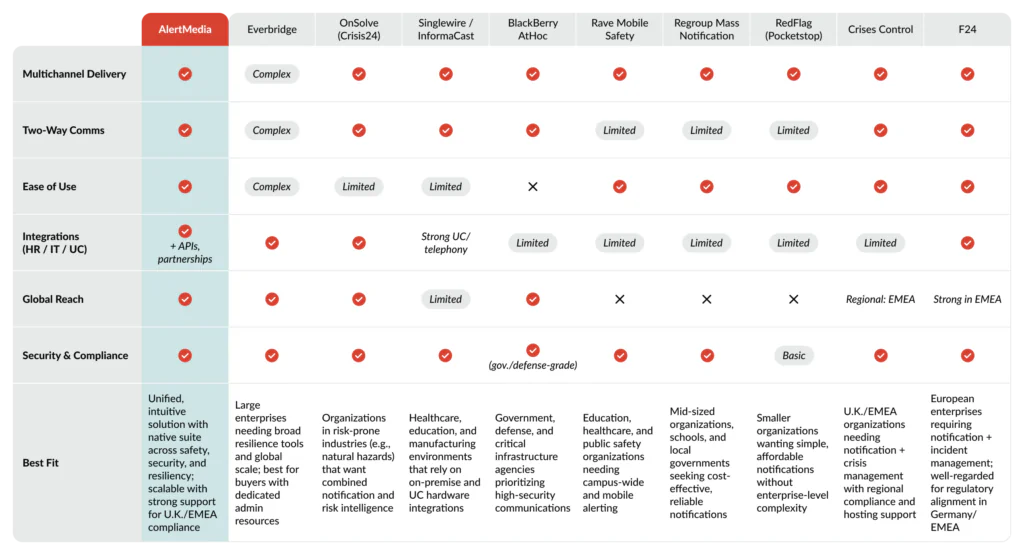
Organizations evaluating employee notification systems in 2026 will find that providers generally fall into two tiers, reflecting differences in enterprise scale, functional breadth, and primary target markets.
Tier 1: Core Enterprise Providers
These are the most established platforms, offering enterprise-grade functionality, multi-site scalability, and advanced integrations. They are typically best suited for large, complex organizations and mid-market buyers who want room to grow without having to replace systems later.
- AlertMedia — Unified, intuitive platform delivering employee notification, emergency communication, incident management, and workforce safety tools in a single, purpose-built solution designed for speed and reliability
- Everbridge — Broad critical event management suite with global scale and deep functionality, though often considered more complex to configure and manage
- OnSolve (Crisis24) — Combines notification with risk intelligence services, with emphasis on security operations and situational awareness
- Singlewire / InformaCast — Widely used in healthcare and education, with strong integrations into IP phones, paging systems, and on-premise communication infrastructure
- BlackBerry AtHoc — Secure communication platform frequently deployed in government, defense, and highly regulated environments
Tier 2: Specialized and Regional Providers
These platforms are designed for more focused needs. They are often strong fits for mid-market organizations balancing budget and capability, or for buyers seeking vendors with specific regional or vertical expertise.
- Rave Mobile Safety — Strong adoption in higher education and public safety; commonly used for campus-focused employee and student alerting
- Regroup Mass Notification — Mid-market solution offering multi-channel alerts, frequently selected by schools and growing organizations
- RedFlag (Pocketstop) — Straightforward notification tool often used by municipalities and smaller enterprises needing simple, reliable messaging
- Crises Control — U.K.-based provider offering notification and incident management features, with emphasis on regional compliance and European deployments
- F24 — European provider delivering emergency notification and crisis management capabilities, commonly used by multinational organizations operating across EMEA
Top 5 Employee Notification Systems in 2026
Our evaluation draws from analyst research, technology review platforms, publicly available product documentation, and customer feedback to provide an objective look at the leading employee notification systems available today. To make this review more practical for buyers, we’ve divided providers into two tiers.
Tier 1: Core enterprise providers
Tier 1 vendors represent the most established employee notification platforms. They offer the scale, integrations, and reliability that larger and more complex organizations often require. These providers are designed to support diverse internal communication needs — from global enterprises with distributed workforces to mid-market organizations that want enterprise-grade functionality with room to grow.
Below, we highlight each Tier 1 provider’s strengths, limitations, and best-fit scenarios.
AlertMedia
How does AlertMedia support employee communications?
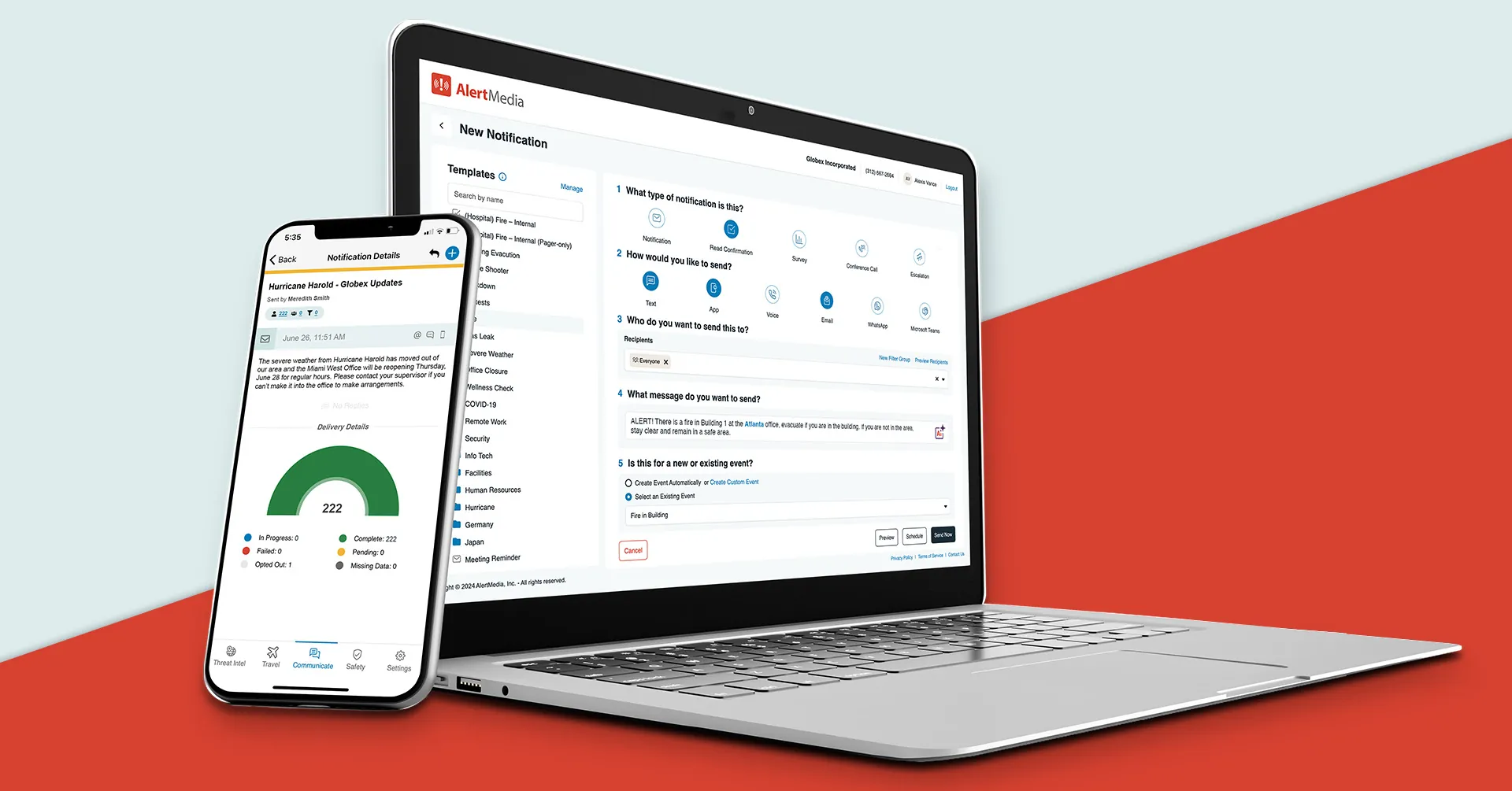
AlertMedia is known for its intuitive, easy-to-use platform that enables organizations to quickly send targeted employee notifications — without sacrificing control or customization. Its multi-channel delivery (SMS, voice, email, mobile push, desktop alerts, and integrations with Microsoft Teams and Slack) helps ensure employees receive messages wherever they are working. Customers frequently cite ease of deployment, fast time-to-value, reliability across large audiences, responsive support, strong mobile app performance, and ongoing product innovation as differentiators.
Unlike platforms assembled through multiple acquisitions, AlertMedia delivers employee notification, emergency communication, incident management, risk intelligence, travel risk management, and employee safety monitoring within a unified, native system. This allows organizations to start with employee alerts and expand into broader resilience capabilities without replacing tools. For multinational employers, the platform’s global infrastructure supports distributed teams while maintaining administrative simplicity. AlertMedia Analytics gives HR and people ops teams visibility into how employees engage with notifications—tracking metrics like delivery success, acknowledgment rates, and mobile app adoption—so gaps in reach surface before they become a problem during a real event.
Organizations seeking highly specialized government-grade compliance frameworks or deeply customized on-premise deployments may require additional evaluation. However, for most enterprises prioritizing usability, scalability, and reliability, AlertMedia offers a balanced approach.
Everbridge
How does Everbridge support employee communications?
Everbridge is one of the largest vendors in the market, offering employee notification as part of a broader critical event management suite. Its platform includes mass notification, IT incident response, public warning, and additional resilience tools, making it attractive to large enterprises and public-sector organizations with complex global operations.
The platform is powerful but often described as complex to configure and manage. Customers note that it may require significant training and dedicated administrative resources. Pricing structures and modular feature packaging can also increase total cost, particularly for organizations that need only employee-focused communication capabilities.
OnSolve (Crisis24)
How does OnSolve support employee communications?
Now part of Crisis24, OnSolve combines employee notification with risk intelligence and situational awareness tools. Its monitoring capabilities and threat feeds make it particularly relevant for security-led organizations and industries exposed to natural hazards or geopolitical risks.
Because its platform components evolved through acquisitions, some users report inconsistent user experiences across modules. Third-party reviews suggest deployments may take longer compared to more streamlined providers, and the system’s primary orientation toward security operations may make it less HR-centric for workforce communication use cases.
Singlewire / InformaCast
How does Singlewire support employee communications?
Singlewire’s InformaCast platform is best known for integrating digital notifications with physical communication systems such as IP phones, speakers, and digital signage. It is widely used in healthcare, education, and manufacturing environments where facility-based alerts are essential.
The platform often integrates closely with Cisco phone environments and other hardware infrastructure, which can limit flexibility for cloud-first enterprises. While robust for campus-style deployments, it may not scale as seamlessly for multinational corporations focused primarily on distributed workforce communication.
BlackBerry AtHoc
How does AtHoc support employee communications?
BlackBerry AtHoc has been deployed for many years in the government, defense, and critical infrastructure sectors. It emphasizes secure communication, structured workflows, and compliance-focused deployments.
Its government-oriented design can lead to more complex administrative workflows than newer cloud-native platforms. Corporate buyers sometimes describe the interface as less intuitive, and implementations may require significant configuration and training.
Other Notable Employee Notification Systems
Tier 2: Specialized and regional providers
Tier 2 vendors play an important role in the employee notification landscape, particularly for organizations seeking focused functionality or regional alignment. Many are well-suited for mid-sized organizations balancing budget and capability, while others emphasize sector-specific or geographic expertise. While their platforms may offer a narrower scope than Tier 1 providers (which often extend into incident management, risk intelligence, travel risk, and safety monitoring), they can deliver meaningful value in the right context.
The following profiles outline where these providers stand out and where they may fall short compared to broader enterprise platforms.
Rave Mobile Safety
Best for education, healthcare, and public safety organizations. Rave offers campus-focused alerting, mobile safety applications, and panic button features that support institutional environments. It is less commonly used for large multinational corporate deployments that require deep HR integrations.
Regroup Mass Notification
Best for schools, municipalities, and mid-sized organizations seeking a straightforward notification platform. Regroup emphasizes multi-channel alert delivery and usability but does not typically offer the broader resilience capabilities found in larger enterprise suites.
RedFlag (Pocketstop)
Best for smaller organizations requiring simple, affordable employee notification. RedFlag delivers multichannel messaging and group communication tools but with more limited integration and scalability compared to Tier 1 providers.
Crises Control
Best for U.K. and Europe-based organizations seeking notification and basic crisis management in one platform. Crises Control provides geo-fencing, mobile apps, and workflow features, with emphasis on regional compliance and data hosting. Its footprint is strongest in Europe.
F24
Best for European enterprises needing notification and incident management capabilities. Based in Germany, F24 serves organizations across EMEA and is often selected for regulatory alignment. Its brand recognition and infrastructure depth are more concentrated in Europe than in North America.
How to Choose the Right System
Selecting the right employee notification platform requires aligning capabilities with your operational model.
Consider:
- Primary use cases (emergency-only vs operational + emergency)
- Workforce size and geographic distribution
- Integration needs with HRIS and identity systems
- Requirement for two-way messaging and accountability
- Administrative simplicity vs customization depth
- Mobile app adoption expectations
- Reporting and compliance requirements
- Global messaging and localization needs
Organizations often underestimate change management. Clear ownership, defined workflows, and executive sponsorship are the factors that most reliably drive long-term adoption of an employee notification system.
Common Implementation Challenges
Even well-designed employee messaging and notification systems require planning for implementation and deployment.
Common challenges include:
- Outdated or incomplete employee contact data
- Unclear internal ownership between HR, IT, and security
- Overly broad distribution groups, causing alert fatigue
- Insufficient training for administrators
- Lack of documented escalation workflows
Addressing governance and data hygiene early can significantly improve system effectiveness.
Frequently Asked Questions
What’s the difference between a mass notification system and an employee notification system?
Mass notification systems can reach broad audiences, including the public. Employee notification systems are typically focused on internal stakeholders —employees, contractors, and on-site personnel. Many enterprise platforms support both, but the primary distinction is audience scope and internal integration depth.
Are employee notification systems only for emergencies?
No. While often implemented for urgent alerts, many organizations use them for operational updates such as IT outages, weather closures, staffing notifications, and business continuity coordination. Broader usage can increase familiarity and improve response during real incidents.
Who typically owns the system internally?
Ownership varies. HR often leads workforce communication use cases, while security or business continuity may manage emergency workflows. IT typically supports integrations and access controls. Shared governance models are common in larger enterprises.
How do these systems ensure delivery success?
Most enterprise platforms use multi-channel redundancy — sending messages via SMS, email, voice, and push notifications simultaneously or sequentially. Escalation rules and delivery tracking provide visibility into who received and acknowledged messages.
How do employee notification systems integrate with HR platforms?
Many systems integrate with HRIS or identity providers to automatically sync employee data, departments, and locations. This reduces manual data entry and helps ensure distribution groups remain accurate as the workforce changes.
What’s the difference between static and dynamic employee groups?
Static groups are manually created and updated by administrators. Dynamic groups automatically update based on employee attributes such as department, title, or location pulled from HR systems. Dynamic groups reduce administrative effort and help ensure the right employees receive notifications as roles, teams, or locations change.
Do employees need to download a mobile app to receive alerts?
Not necessarily. Most employee notification systems support SMS, email, and voice calls without requiring an app. However, a dedicated mobile app can improve delivery reliability, enable push notifications, support two-way messaging, and provide additional safety features such as check-ins or location sharing.
Can employee messaging systems target people by location?
Yes. Many platforms offer geo-targeting capabilities that allow organizations to send alerts based on office location, facility, or real-time geography. This is particularly useful for site-specific emergencies, weather events, or regional disruptions that do not affect the entire workforce.
How do these systems integrate with collaboration tools like Microsoft Teams?
Many enterprise platforms integrate with collaboration tools to extend alerts into existing workflows. Notifications can be delivered into Teams channels, and some systems allow message initiation directly from those environments. Integration depth varies by provider and may require configuration or API support.
What security and data protection features should buyers expect?
Enterprise-grade employee notification systems typically include role-based access controls, encryption in transit and at rest, audit logs, and secure data hosting. Organizations operating internationally should also evaluate regional data residency options and alignment with privacy regulations such as GDPR.